
App Integrations
 Checkout other Integrations
Outlook Calendar
View tasks added in SmartTask on your Outlook Calendar. Sync tasks and ensure things don't fall through cracks.
About SmartTask's integration with Outlook Calendar
With this integration get view your tasks from SmartTask in your Outlook Calendar. Task with same start and due date will show up as a whole day task. Click on the event in Outlook calendar to go to task's url.
NOTE: This is only one way sync which means events entered in Outlook Calendar won't showup in SmartTask.
How to integrate SmartTask with Google Calendar:
- Generate Url from SmartTask Apps & Integrations menu.
- Open Outlook Calendar.
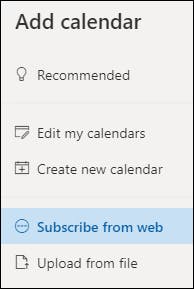
- From the Navigation pane click on Add Calendar
- Select Subscribe from web.
- Enter the URL you generated earlier.
- Select Import.
Achieve Your Firm’s True Potential
Plan your resources smarter with one scalable client delivery management system.
Try it Live - It's FREE

