
Templates
Agile Project Management
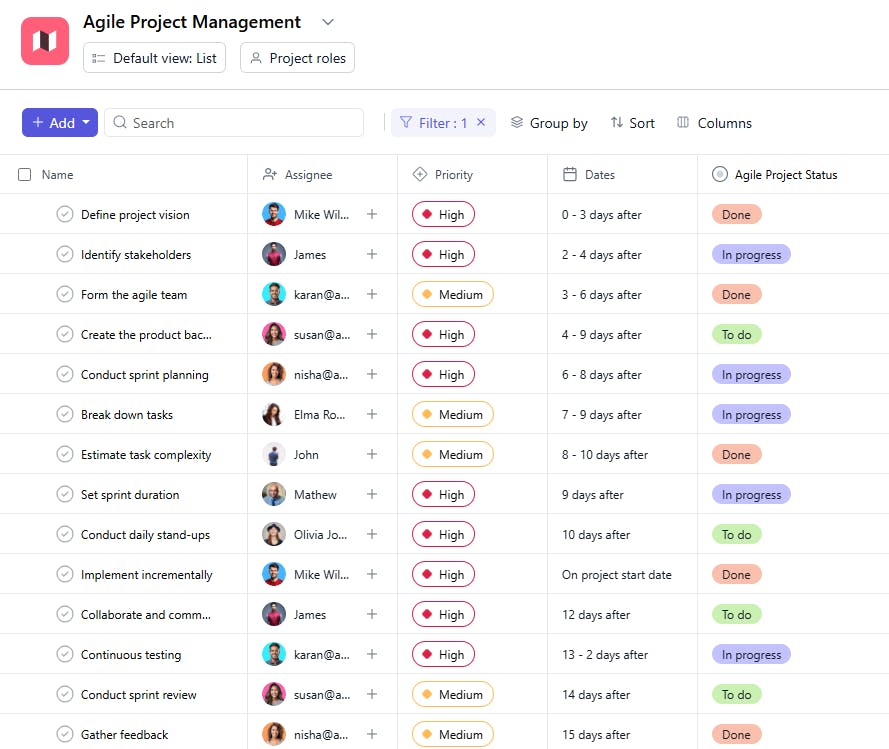
The Agile Project Management Template ensures that projects are efficiently managed with clear tasks, priorities, and deadlines, leading to smoother collaboration and timely project delivery.
Use TemplateCategories
What is an Agile Project Management Template?
An Agile Project Management Template is a tool designed to help project teams track tasks, monitor progress, and manage priorities in an agile environment. It includes task names, assignees, priorities, start dates, statuses, descriptions, and due dates. This template ensures that teams remain focused on delivering incremental value and staying on track with project goals.
Here’s a closer look at its key features:
Agile Project Management Template: Key Features
- Flexible Task Management: Easily break down large projects into manageable tasks and organize them into sprints for continuous progress.
- Sprint Planning & Tracking: Schedule and monitor your sprint cycles, ensuring your team stays on track and delivers within deadlines.
- Collaboration Tools: Facilitate team communication through shared task updates, comments, and notifications to keep everyone in sync.
- Progress Analytics: Track your team’s performance with real-time data and metrics to identify bottlenecks and optimize workflows.
How to Use the Agile Project Management Template
Here’s a step-by-step guide to getting started with the Agile Project Management Template:
- Select & Customize the Template: Choose the Agile project management template from your PM tool (e.g., SmartTask, Jira, Monday.com), and tailor it to your specific project needs.
- Define Project Backlog: Add tasks, user stories, and deliverables to the project backlog, categorizing them by priority.
- Organize Sprints: Break the backlog into sprints, set sprint goals, and assign tasks to team members for completion.
- Track Progress & Adjust: During each sprint, track task status, update progress, and make adjustments to keep the team on target.
- Review & Retrospective: After each sprint, hold a retrospective meeting to evaluate team performance, discuss challenges, and plan for improvements.
Custom Fields for Enhanced Organization
This Agile Project Management Template includes the following fields for task management and tracking:
- Task Name: A clear name for each task or user story.
- Assignee: The team member responsible for the task.
- Priority: High, Medium, Low
- Start Date: The date the task was initiated.
- Status: Not Started, In Progress, Completed
- Description: A brief overview of the task objectives.
- Due Date: The target date for task completion.
Additional Customization Options
Here are a few ways to further customize the Agile Project Management Template:
- Sprint Number: Add a field for tracking which sprint each task belongs to.
- Dependencies: Include a column to track if tasks depend on others before they can begin.
- Estimated Effort: Add an estimated effort field to track time or resources required for each task.
- Completion Percentage: Track the progress of each task in terms of percentage.
- Notes: Include a section for team members to add additional notes or comments regarding the task.


