
Templates
Accounts Receivable
The Accounts Receivable Template provides a comprehensive framework to track, manage, and reconcile incoming payments from clients or customers. This template ensures financial transparency, timely follow-ups, and effective cash flow management for organizations of all sizes.
Use TemplateCategories
What is an Accounts Receivable Template?
An Accounts Receivable Template is a structured tool designed to manage invoices, monitor payment statuses, and ensure timely collection of dues. It helps finance and accounting teams maintain accurate records of client payments, outstanding balances, and payment methods.
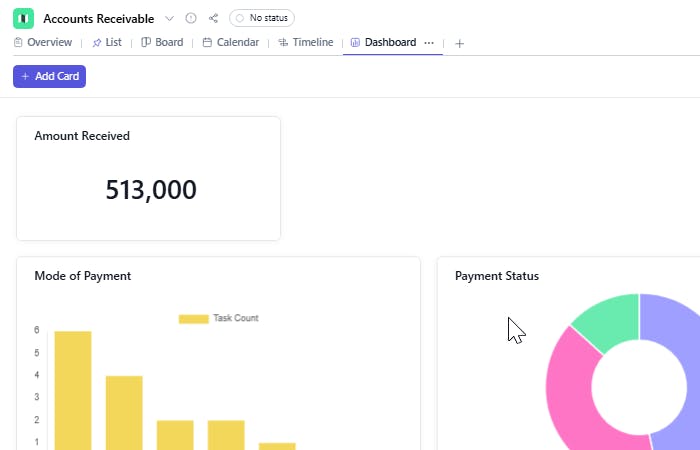
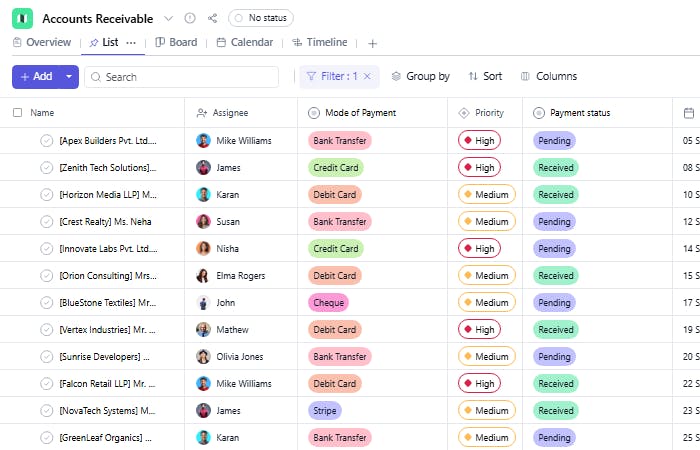
The template includes fields such as task name, assignee, priority, mode of payment, payment date, total amount, amount received, pending balance, payment status, and GST/tax amount — ensuring efficient financial tracking and quick resolution of pending dues.
Here’s a closer look at its key features:
Accounts Receivable Template: Key Features
- Centralized Payment Tracking: Keep all client payments and outstanding invoices organized in one place.
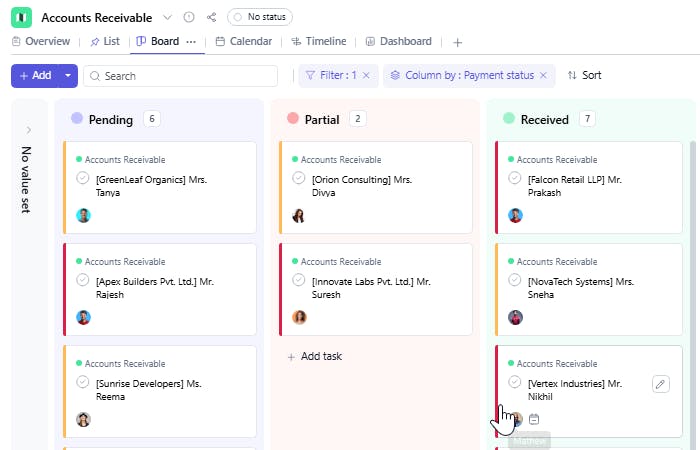
- Status Visibility: Track the current payment stage — whether pending, partially received, or completed.
- Automated Follow-Ups: Use due dates and payment dates to schedule reminders for pending payments.
- Priority-Based Sorting: Categorize clients or invoices by priority to ensure high-value payments are followed up promptly.
- Comprehensive Financial Overview: View total amounts, received payments, pending balances, and applicable taxes at a glance.
How to Use the Accounts Receivable Template
Here’s a simple guide to getting started with the Accounts Receivable Template:
- Add Receivable Entries: Create tasks for each client payment or invoice raised, adding all relevant financial details.
- Assign Responsibility: Assign finance or account managers to each task to ensure accountability for follow-ups and collections.
- Track Payment Progress: Regularly update payment status, amounts received, and pending balances.
- Review Reports: Use filters and reports to identify overdue payments, analyze trends, and maintain healthy cash flow.
Custom Fields for Enhanced Organization
This Accounts Receivable Template includes the following fields for detailed tracking and management:
- Task Name: Represents the specific client invoice or payment entry (e.g., “Invoice #1023 – ABC Pvt. Ltd.”).
- Assignee: The finance or accounts team member responsible for managing the payment.
- Priority: Indicates the importance or urgency of the payment (High, Medium, or Low).
- Mode of Payment: Specifies how the payment was made — Bank Transfer, UPI, Cheque, or Cash.
- Payment Date: The date when the payment was received or expected.
- Total Amount: The total billed amount before deductions.
- Amount Received: The actual payment amount received from the client.
- Pending Balance: The remaining amount yet to be received.
- Payment Status: Indicates the current payment stage — Pending, Partial, or Completed.
- GST / Tax Amount: The portion of the total amount that accounts for GST or applicable taxes.
Additional Customization Options
Here are a few ways to further customize the Accounts Receivable Template:
- Client Name: To specify which client the payment belongs to.
- Invoice Number: For quick reference and verification.
- Due Date: To track payment deadlines and overdue entries.
- Remarks / Notes: For adding comments about payment follow-ups or client communication.
- Payment Reference ID: To record transaction or cheque numbers for audit purposes.


