
Templates
Properties for Sale
The Properties for Sale Template provides a structured and efficient way for real estate professionals, brokers, or agencies to manage properties listed for sale. It helps track every property’s status, pricing, location details, and sales progress ensuring no opportunity is missed and all listings are effectively monitored from listing to closure. This template is ideal for real estate sales teams, property managers, and independent agents who need to organize, prioritize, and streamline their property selling workflow.
Use TemplateCategories
What is a Properties for Selling Template?
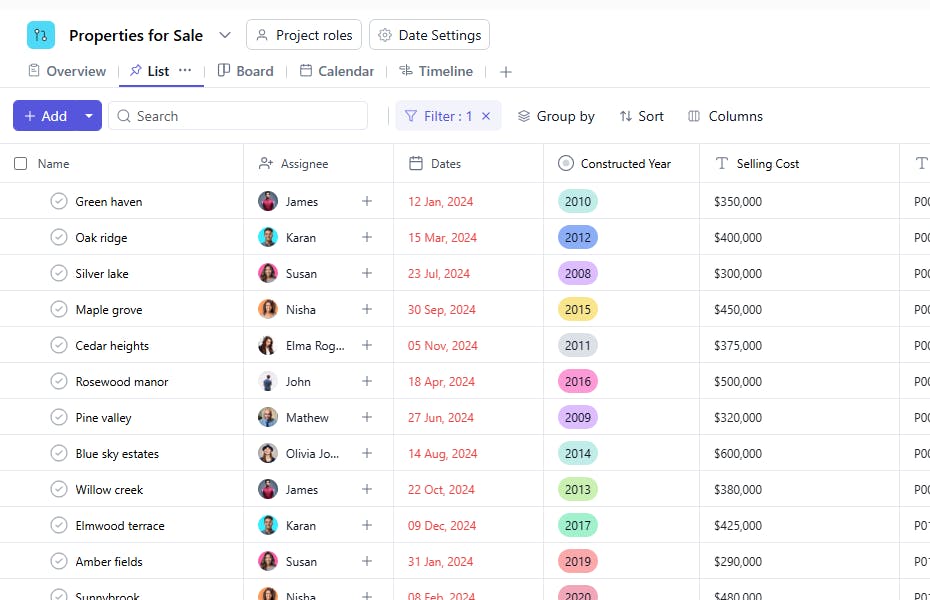
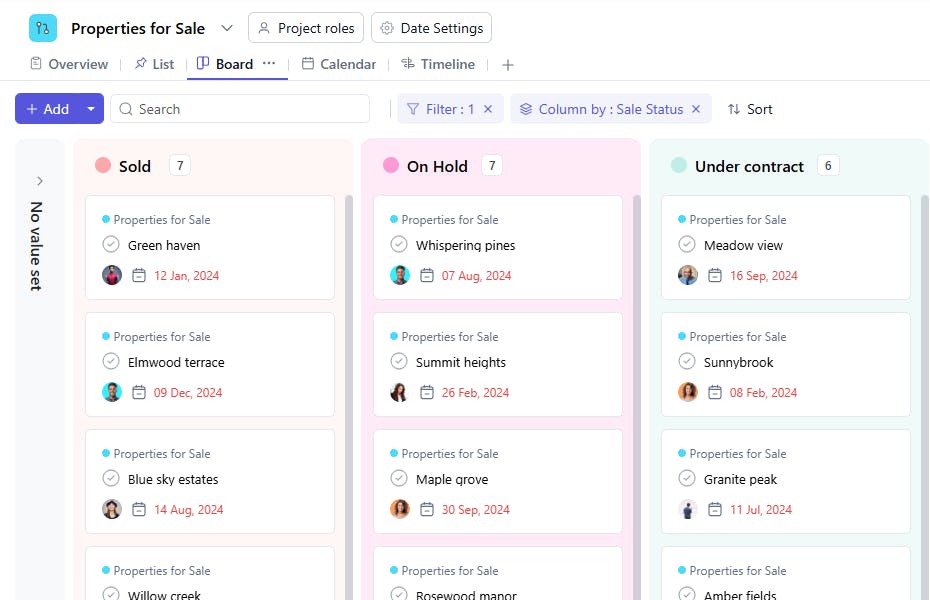
A Properties for Sale Template is a well-defined framework that allows you to manage multiple property listings efficiently. Each task represents a property currently in your selling portfolio and can be tracked through its different selling stages such as On Hold, Under Contract, or Sold.
By centralizing essential property details like pricing, location, and construction year, this template helps real estate teams analyze profitability, track sales progress, and maintain clear communication across stakeholders.
Properties for Sale Template: Key Features
- Organized Property Listings: Manage all your available, under-contract, and sold properties from a single dashboard.
- Sales Stage Visibility: Monitor the current Sale Status of each property to plan follow-ups and prioritize hot leads.
- Detailed Property Insights: Record critical details like Constructed Year, Property ID, and Nearby landmarks for quick reference.
- Cost Tracking: Compare Selling Cost vs Actual Cost to measure profitability and improve pricing strategies.
- Task Ownership: Assign each property listing to a specific Assignee for clear accountability and timely updates.
How to Use the Properties for Sale Template
- Create a Task for Each Property: Add each property as a separate task under your real estate selling project.
- Set the Sale Status: Use the Sale Status field to mark whether a property is On Hold, Under Contract, or Sold.
- Add Property Details: Enter the Property ID, Nearby landmarks, and Constructed Year for reference.
- Assign Ownership: Assign the property to the responsible team member or agent handling the sale.
- Track Financials: Update Selling Cost and Actual Cost fields to evaluate margins and financial performance.
- Monitor Timelines: Use Start Date to track when the property was listed or made available for sale.
- Update Regularly: Keep the Sell Status updated as the property progresses through different stages.
Custom Fields for Properties for Sale
This Properties for Selling Template includes the following fields for effective tracking and management:
- Sale Status – Indicates the property’s sales stage (On Hold, Under Contract, Sold).
- Property ID – A unique identifier for internal or CRM tracking.
- Nearby – Key nearby landmarks or localities for quick reference.
- Constructed Year – The year when the property was built.
- Selling Cost – The listed or negotiated selling price of the property.
- Start Date – The date when the property was listed or added to the sales pipeline.
- Actual Cost – The original acquisition or construction cost for profitability comparison.


