
Templates
Real Estate CRM
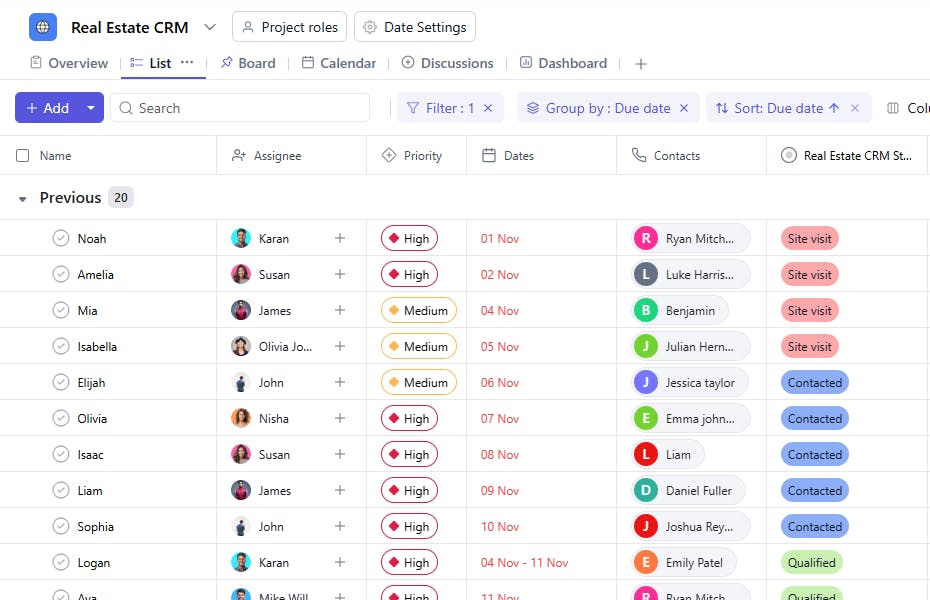
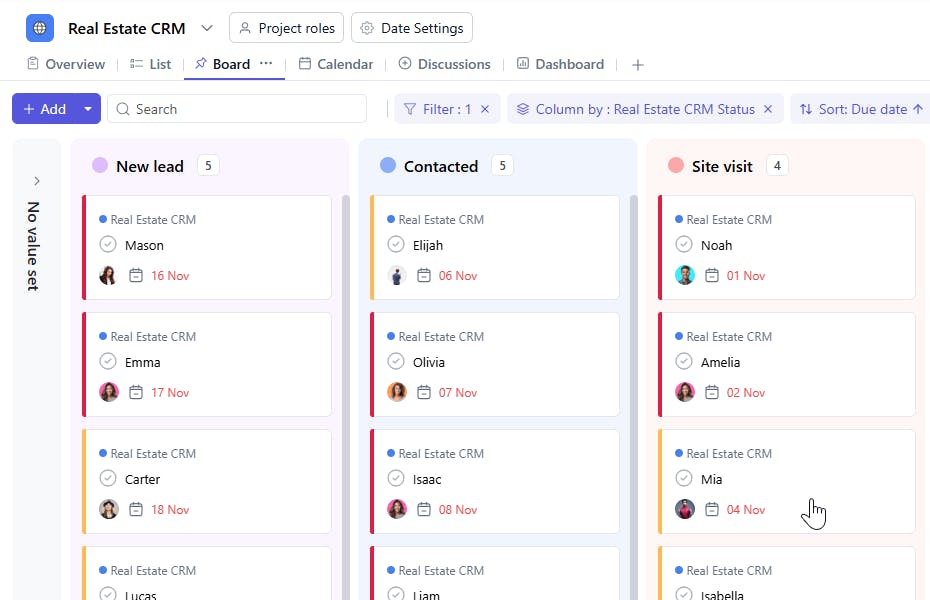
The Real Estate CRM Template offers a comprehensive framework to manage and track client interactions, property preferences, and sales progress. This template ensures organized communication, streamlined processes, and enhanced client satisfaction.
Use TemplateCategories
What is a Real Estate CRM Template?
A Real Estate CRM Template is a structured tool designed to manage client relationships and sales activities efficiently. It includes task names, email IDs, assignees, contact numbers, statuses, contact dates, priorities, interested sites, floor details, property values, sources, and square footage. This enables real estate teams to nurture leads, manage clients, and close deals effectively.
Here’s a closer look at its key features:
Real Estate CRM Template: Key Features
- Comprehensive Client Information: Capture essential details like client preferences, contact information, and budget to tailor your services.
- Property Tracking: Keep detailed records of properties, including descriptions, images, and status updates, ensuring clients receive accurate information.
- Collaborative Sales Process: Assign tasks, update property statuses, and manage communication in real-time to maintain consistency in the sales process.
- Automated Alerts: Receive automated notifications about important follow-ups, scheduled property viewings, or contract updates.
How to Use the Real Estate CRM Template
Here’s a simple guide to getting started with the Real Estate CRM Template:
- Select and Customize: Choose the Real Estate CRM Template from SmartTask Template library. Customize it with property types, client preferences, and communication timelines.
- Enter Client and Property Details: Input essential details about your clients, including contact information, budget, and property preferences. Add properties to the system with all relevant data.
- Assign Tasks: Delegate follow-ups, property viewings, and contract negotiations to the appropriate team members, keeping tasks tracked in real time.
- Set Up Notifications: Set up alerts to notify you about upcoming property viewings, client follow-ups, or important deadlines.
- Monitor and Update: Track client interactions, manage offers, and update property statuses. Use collaboration tools like task comments and real-time chat to respond quickly to client requests.
Custom Fields for Enhanced Organization
This Real Estate CRM Template includes the following fields for detailed tracking and management:
- Contact: Prospect information
- Deal Status: New, In Progress, Closed
- Contact Date: The last date the client was contacted.
- Interested Site: The property or site the client is interested in.
- Floor: Floor preferences for multi-story properties.
- Value: The estimated or discussed property value.
- Source: Website, Referral, Advertisement
- SQFT: The size of the property in square feet.
Additional Customization Options
Here are a few ways to further customize the Real Estate CRM Template:
- Follow-Up Dates: Add a field for scheduling follow-ups.
- Client Notes: Include a section for additional details or special requests.
- Property Tours: Add a field to track scheduled site visits or tours.
- Closing Date: Record the expected or actual closing date of the deal.
- Feedback: Add a field to document client feedback for future improvements.


