
Templates
Case Management
The Case Management Template is designed for legal firms, consultancies, and professional service providers to efficiently track and manage cases throughout their lifecycle. It ensures a structured workflow from client consultation to final execution, promoting accountability, timely updates, and transparency in case handling.
Use TemplateCategories

What is a Case Management Template?
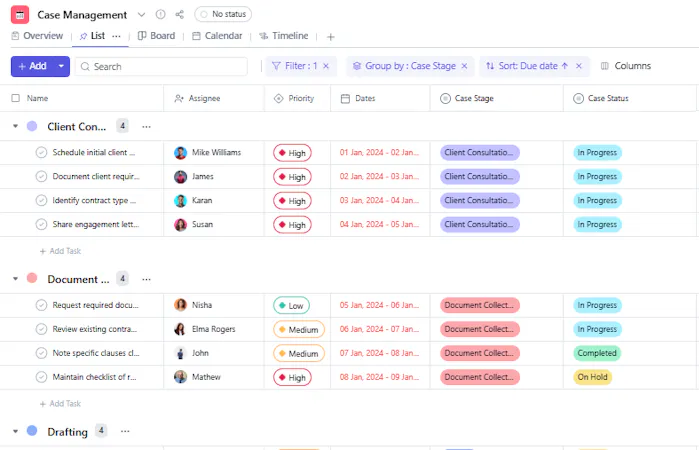
A Case Management Template provides a structured framework to manage the entire lifecycle of client cases. Each task represents a specific case and is categorized by stages such as client consultation, drafting, review, and closure.
The template standardizes information tracking through defined custom fields and stages, allowing teams to manage deadlines, responsibilities, and client communications more effectively.
Case Management Template: Key Features
- Stage-Based Tracking: Monitor each case as it progresses through multiple stages—consultation, drafting, review, and closure.
- Centralized Information: Store all case-related details including documents, timelines, and responsible team members in one place.
- Deadline Management: Keep track of start and due dates to ensure all deliverables are completed within the agreed timeline.
- Priority Handling: Assign and monitor priorities to handle urgent or high-value cases efficiently.
- Accountability & Collaboration: Assign ownership to team members for each stage and track updates in real-time.
How to Use the Case Management Template
- Create a Task for Each Case: Each task represents one active client case or matter.
- Select the Case Stage: Update the Case Stage to reflect the current phase (e.g., Client Consultation, Drafting, or Closure).
- Track Case Progress: Use Case Status to indicate whether the case is Open, In Progress, On Hold, or Closed.
- Add Timelines: Record Start Date and Due Date to ensure each stage is completed on schedule.
- Assign Team Members: Use the Assignee field to allocate responsibilities to specific team members.
- Prioritize Cases: Set Priority (High, Medium, or Low) to focus on cases that need immediate attention.
- Update as You Progress: Move the case through different stages until it reaches Execution & Closure.
Custom Fields for Case Management
This Case Management Template includes the following custom fields for systematic and comprehensive tracking:
- Case Stage – The current phase of the case workflow (e.g., Drafting, Client Review).
- Case Status – Status of the case such as Open, In Progress, On Hold, or Closed.


