
Templates
Casting Sheets and Audition
The Casting Sheets and Auditions Template streamlines the audition process, helping teams manage auditions efficiently, ensuring that the best actors are selected for each role while maintaining a smooth workflow.
Use TemplateCategories
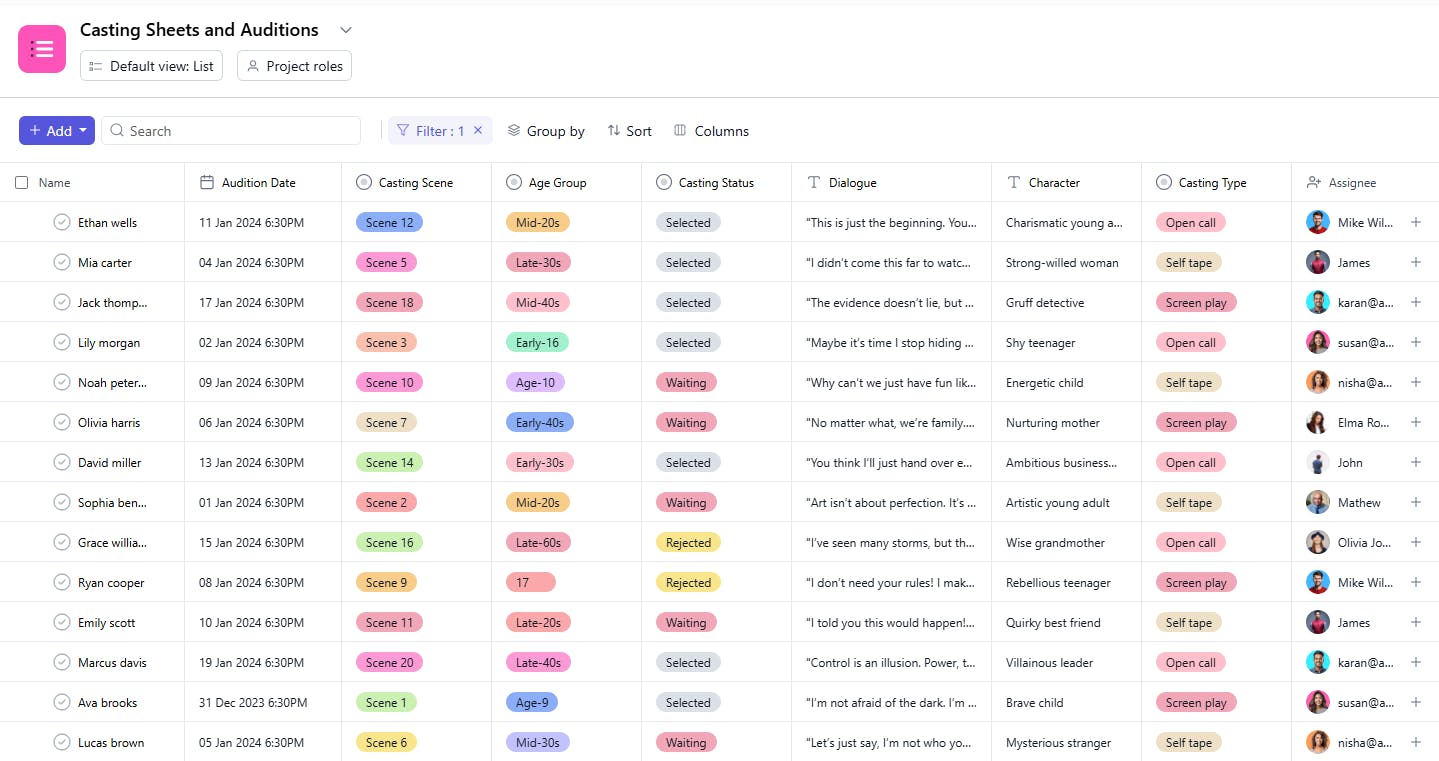
What is a Casting Sheets and Auditions Template?
A Casting Sheets and Auditions Template is a tool designed to help teams organize and track the casting and audition process. It includes details such as task names, character information, audition dates, casting scenes, dialogues, assignees, and audition statuses. This template helps casting directors and production teams stay on top of all audition activities, ensuring that no detail is overlooked and that each role is cast appropriately.
Here’s a closer look at its key features:
Casting Sheets and Auditions Template: Key Features
- Organized Audition Management: Track essential audition details such as casting calls, audition schedules, and actor information to ensure smooth coordination.
- Role Assignment and Tracking: Assign roles to actors, track audition outcomes, and record any feedback or notes from directors.
- Audition Schedule: Manage the timing and scheduling of auditions, ensuring each actor has the correct time slot.
- Actor Profile Management: Keep a detailed record of actor profiles, including contact information, experience, and headshots.
- Collaboration and Feedback: Facilitate communication between casting directors, producers, and team members, ensuring decisions are made collaboratively.
How to Use the Casting Sheets and Auditions Template?
Here’s a step-by-step guide to using SmartTask’s Casting Sheets and Auditions Template:
- Add Audition Details: Start by entering the casting call title, role descriptions, and audition dates.
- Create Actor Profiles: Add details of the actors auditioning, such as their names, contact info, previous experience, and a link to their demo reel or headshots.
- Schedule Auditions: Assign audition time slots to actors and make sure everything is organized according to the production timeline.
- Track Audition Outcomes: After each audition, record feedback, status (e.g., callback, hired), and notes from directors or producers.
- Assign Roles: Once the casting decisions are made, assign roles to actors and update the status accordingly.
- Finalize Contracts: Once actors are selected, track contract negotiations and approvals to ensure timely finalization.
Custom Fields for Enhanced Organization
This Casting Sheets and Auditions Template includes the following fields for task management and tracking:
- Character: The character being cast (e.g., Hero, Villain).
- Age Group: The age range of the character (e.g., Teen, Adult).
- Type: The type of character (e.g., Lead, Supporting).
- Audition Date: The date of the audition.
- Casting Scene: The scene or scenes the actor will perform during the audition.
- Dialogue: The lines or dialogue for the audition.
- Status: The current status of the audition (e.g., Scheduled, Completed).
Additional Customization Options
Here are a few ways to further customize the Casting Sheets and Auditions Template:
- Casting Director Notes: Include a field for additional notes or feedback from the casting director.
- Actor's Contact Information: Add a section for the actor’s contact details.
- Callback Status: Track whether an actor is selected for a callback.
- Rehearsal Details: Include a section for scheduling rehearsals if necessary.
- Contract Status: Track whether a contract has been offered or signed for the role.


