
Templates
Commission Sheet
The Commission Sheet Template helps track and manage sales performance, commission rates, and payments, ensuring that commission calculations are accurate and transparent for the sales team.
Use TemplateCategories
What is a Commission Sheet Template?
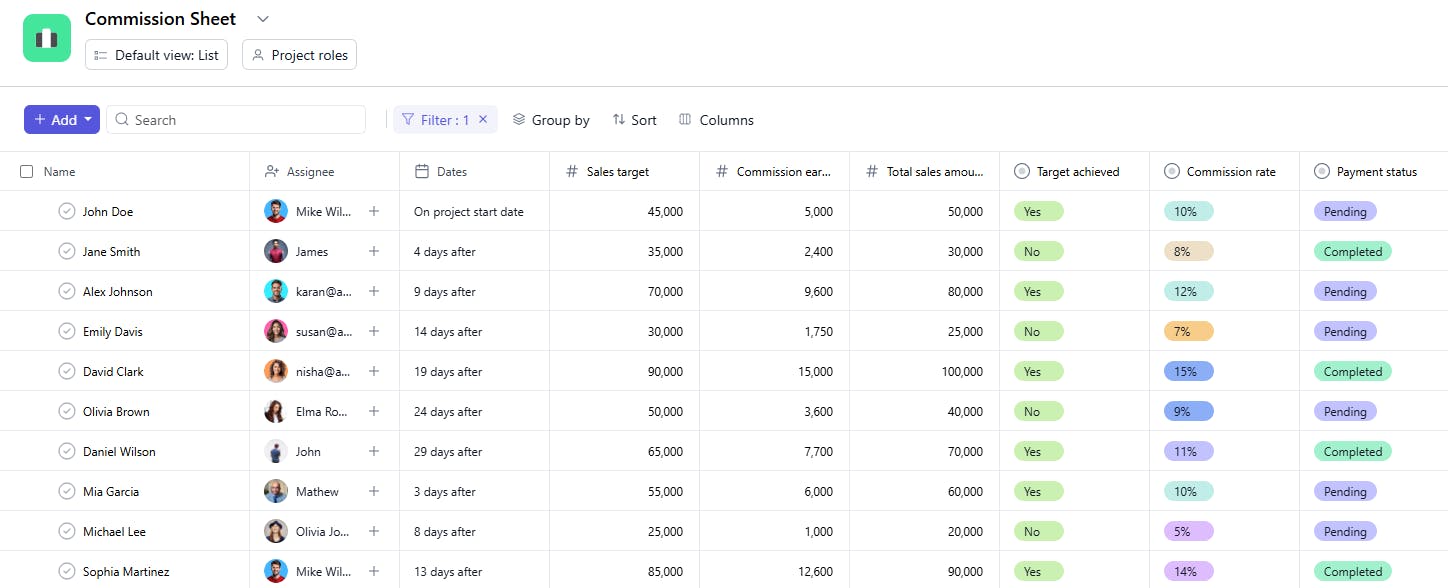
A Commission Sheet Template is a tool used to track sales performance and calculate commissions earned by employees or sales teams. It includes key details such as task names, total sales amounts, assignees, commission rates, earned commissions, sales targets, target achievements, payment statuses, and dates. This ensures clarity and accuracy in commission tracking, helping motivate sales teams and streamline payment processes.
Here’s a closer look at its key features:
Commission Sheet Template: Key Features
- Detailed Sales Tracking: Keep a detailed record of sales made by employees, including total sales, commission rates, and commission amounts earned.
- Commission Breakdown: Break down commissions by product, service, or sales region to gain a clear understanding of where commissions are coming from.
- Monthly/Quarterly Tracking: Track commissions on a monthly or quarterly basis, ensuring timely and accurate commission payments.
- Performance-Based Calculations: Link commissions directly to performance targets, ensuring alignment with sales goals and company objectives.
- Task Assignment & Monitoring: Assign commission tasks, such as verifying sales or calculating payouts, and monitor their completion.
How to Use the Commission Sheet Template?
Here’s a step-by-step guide to using SmartTask’s Commission Sheet Template:
- Enter Sales Data: Start by entering details of each sale, including the salesperson’s name, product or service sold, and the total value of the sale.
- Apply Commission Rates: Enter commission rates based on the salesperson's role or specific product/service, and calculate the commission for each sale.
- Track Earnings: Keep track of the total commission earned by each salesperson over time (monthly, quarterly, or annually).
- Monitor Performance: Use performance metrics like sales goals or targets to calculate commissions based on targets achieved.
- Assign Responsibilities: Assign the commission review and verification tasks to the appropriate team members to ensure accuracy.
- Generate Reports: Generate detailed reports to review commission data, identify trends, and ensure accuracy in payments.
Custom Fields for Enhanced Organization
This Commission Sheet Template includes the following fields for better tracking and management:
- Total Sales Amount: The total sales made by the assignee.
- Commission Rate: The percentage or rate at which commission is earned.
- Commission Earned: The total commission earned based on the sales and rate.
- Sales Target: The sales goal set for the assignee.
- Target Achieved: Yes, No, Exceeded
- Payment Status: Pending, Paid, Overdue
Additional Customization Options
Here are a few ways to further customize the Commission Sheet Template:
- Commission Category: Add categories for commissions (e.g., Sales Commission, Referral Commission).
- Bonus Tracking: Include a field to track any additional bonuses earned based on performance.
- Commission Type: Specify the type of commission (e.g., Percentage, Fixed Amount).
- Notes: Add space to include any additional notes or comments regarding the commission (e.g., adjustments, special deals).
- Payment Method: Track the payment method used for commission payments (e.g., Bank Transfer, Check).


