
Templates
Competitor Research
Staying ahead of your competitors is crucial to maintaining a competitive edge.
Use TemplateCategories
What is a Competitor Research Template?
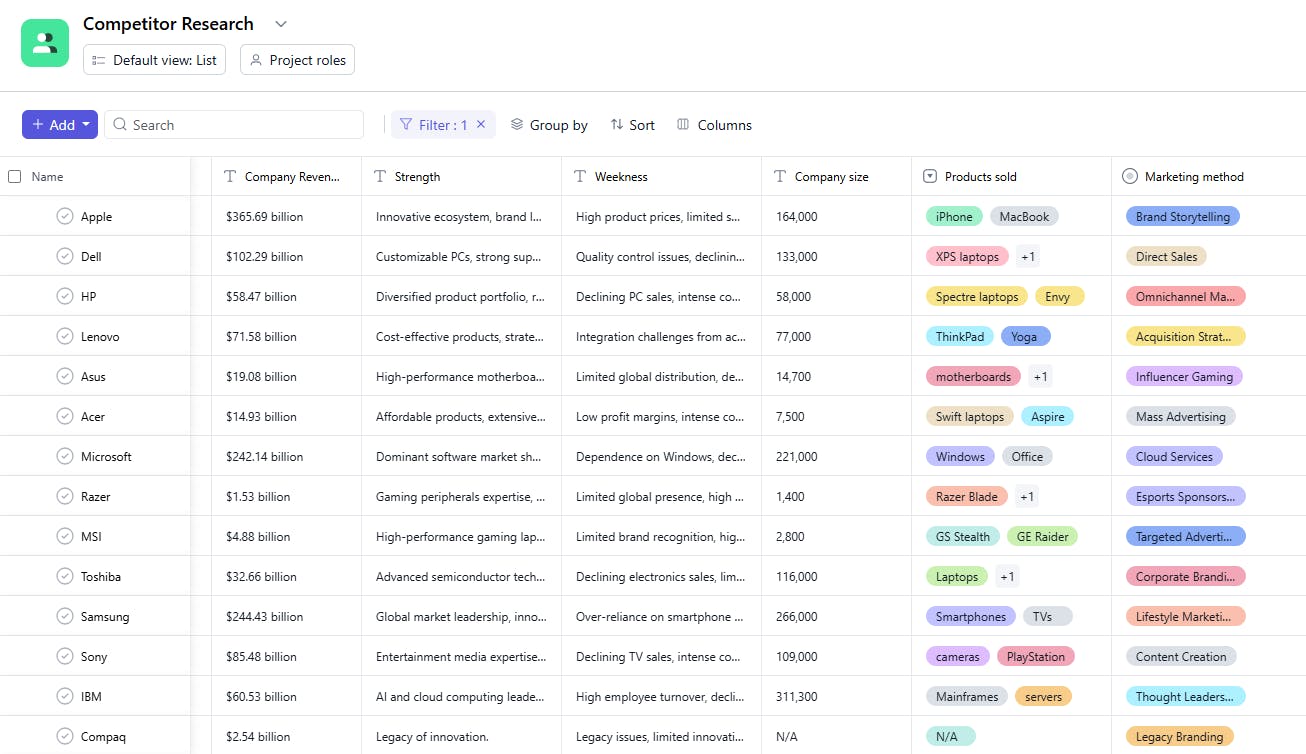
The Competitor Research template is your go-to tool for collecting, organizing, and analyzing vital competitor information in one central place. From pricing and product features to market positioning, this template helps you capture key details, enabling you to evaluate your competition and refine your strategies for success.
Let’s take a closer look at its key features:
Competitor Research Template: Key Features
- Centralized Competitor Data: Track essential details like pricing, product features, market trends, and more—all in one place. This makes it easier to compare competitors and uncover actionable insights.
- SWOT Analysis Framework: Evaluate your competitors' strengths, weaknesses, opportunities, and threats (SWOT), so you can make strategic decisions based on comprehensive research.
- Clear Milestones and Deadlines: Set clear research milestones like "Complete SWOT analysis by [date]" or "Finish competitive pricing review by [date]," ensuring your research stays organized and on track.
- Real-Time Collaboration: Collaborate effortlessly with your team, sharing insights and updates in real-time for quicker decision-making.
- Actionable Reports: Generate customizable reports that highlight key findings, making it easier to present research outcomes to stakeholders and refine your strategies.
How to Use the Competitor Research Template
Ready to dive in? Here’s how to start using the Competitor Research template and get your analysis underway:
- Launch the Template: Simply log into SmartTask, choose the Competitor Research template, and start your project—no setup needed.
- Add Competitor Data: Input details such as competitor names, pricing models, product features, and key market trends. Customize the template to capture all the critical information you need.
- Set Milestones and Deadlines: Define research phases like "Complete SWOT analysis" or "Finish competitor comparison by [date]" to keep the project on schedule.
- Track Progress: Stay on top of every task using SmartTask’s built-in tracking features, ensuring that nothing slips through the cracks.
- Assign Tasks: Assign specific research tasks—such as "Analyze marketing tactics" or "Compare product features"—to team members, so everyone knows what to focus on.
Custom Fields for Enhanced Organization
SmartTask's Competitor Research template includes several custom fields:
- Deal Won: Number of deals won by them in that year.
- URL: URL of their website
- Unique Slogan: Unique slogan for each company
- Company CEO: CEO Name
- Sector: Electronics, Computer, Software, Gaming, IT, Semiconductors, Telecommunication, Internet Communication.
- Company Revenue: Total revenue earned by the company.
- Company Size: Total number of people working in the company
- Product Sold: What product do they sell.
- Marketing Method: Brand Storytelling, Direct Sales, Omnichannel Marketing, Acquisition Strategy, Influencer Gaming, Mass Advertising, Cloud Services
Additional Customization Options
To get the most out of your Competitor Research template, here are a few ways you can tailor it to fit your specific needs:
- Custom Task Fields: Add extra details such as URLs, company size, revenue, marketing methods, or unique slogans to create detailed competitor profiles.
- Sector and Market Tags: Track competitors by specific sectors or market segments to better focus your research efforts.
- Competitor Information: Include important company details like CEO names, product offerings, headquarters location, and deal history for a fuller picture of each competitor.
- Opportunity Tracking: Monitor competitor performance by tracking “Deal Won” or “Deal Lost” to understand their market activity better.
- Ongoing Monitoring: Keep the template updated to continuously track competitor changes and shifts in strategy, helping you stay proactive in your research.


