
Templates
Compliance Tracking
Managing and tracking compliance across various projects, teams, and regulatory requirements can be complex. SmartTask’s Compliance Tracking Template simplifies this process, ensuring that all compliance activities are tracked, deadlines are met, and responsibilities are clear.
Use TemplateCategories
What is a Compliance Tracking Template?
A Compliance Tracking Template helps you stay organized by ensuring that every regulatory requirement is addressed, assigned, and tracked efficiently. Whether you’re managing internal policies, industry regulations, or legal obligations, this template provides a comprehensive overview of your compliance status and upcoming actions.
Here’s a closer look at its key features:
Compliance Tracking Template: Key Features
- Regulatory Requirement Management: Capture and organize all compliance-related tasks and obligations, ensuring that nothing is missed.
- Task Assignment & Accountability: Assign compliance tasks to specific team members, with clear deadlines and priorities, to ensure accountability.
- Timeline & Milestone Tracking: Set deadlines for key compliance tasks and monitor progress to avoid missed regulatory requirements.
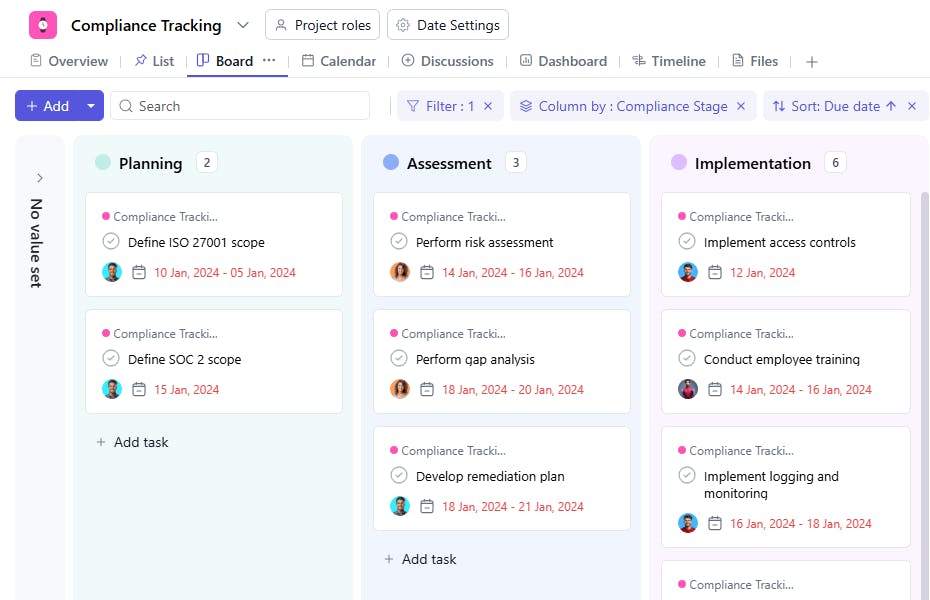
- Status Tracking: Track the progress of each compliance task, with real-time status updates, to ensure timely completion.
- Audit Trail: Maintain a record of all compliance activities, with notes on actions taken, approvals, and updates, for easy reporting and audits.
How to Use the Compliance Tracking Template?
Here’s a step-by-step guide to using SmartTask's Compliance Tracking Template:
- Capture Compliance Tasks: Start by entering all regulatory requirements and compliance tasks in the template. You can categorize them by compliance type (e.g., GDPR, SOX, HIPAA) and set priority levels.
- Assign Responsibility: Assign specific tasks to team members, ensuring clear ownership of compliance obligations.
- Set Deadlines: Define deadlines for each task to ensure timely completion. Use reminders to alert responsible team members ahead of critical dates.
- Track Status: Regularly update task statuses to stay on top of progress and identify any delays.
- Review & Report: Track compliance activities over time and generate reports for management or regulatory authorities. Use the audit trail to track all updates and changes.
Custom Fields for Enhanced Organization
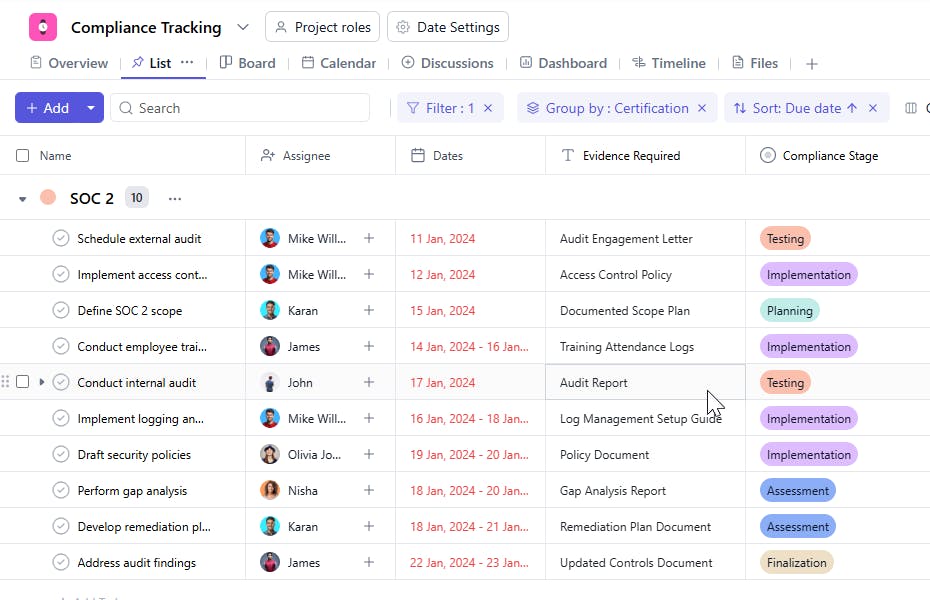
SmartTask's Compliance Tracking Template includes several custom fields to help you organize and manage compliance tasks:
- Evidence: Type of evidence they submit (EG, Document, PDF, image)
- Compliance Stage: New, Assessment, Implementation, Testing, Documentation.
- Certification: Under which certification ID has the complaint been raised.
Additional Customization Options
Here are a few more ways to customize the Compliance Tracking Template:
- Automated Notifications: Set up reminders and alerts for upcoming compliance deadlines and overdue tasks.
- Collaboration: Use task comments, file sharing, and team chat features to collaborate on compliance tasks and document important decisions.
- Visual Timelines: Manage and track compliance deadlines using Gantt charts or visual timelines to prevent bottlenecks and ensure smooth execution.
- Custom Reports: Generate detailed compliance reports to share with stakeholders, auditors, or regulatory bodies.
The Compliance Tracking Template is your go-to solution for ensuring your team meets all compliance obligations, stays organized, and provides clear, accurate reports on compliance progress.


