
Templates
Construction Site Management
Gain a bird’s-eye view of progress across all your construction projects, from foundation to finishing and ensure every site stays on track, on budget, and on time.
Use TemplateCategories
Slide 1 of 2 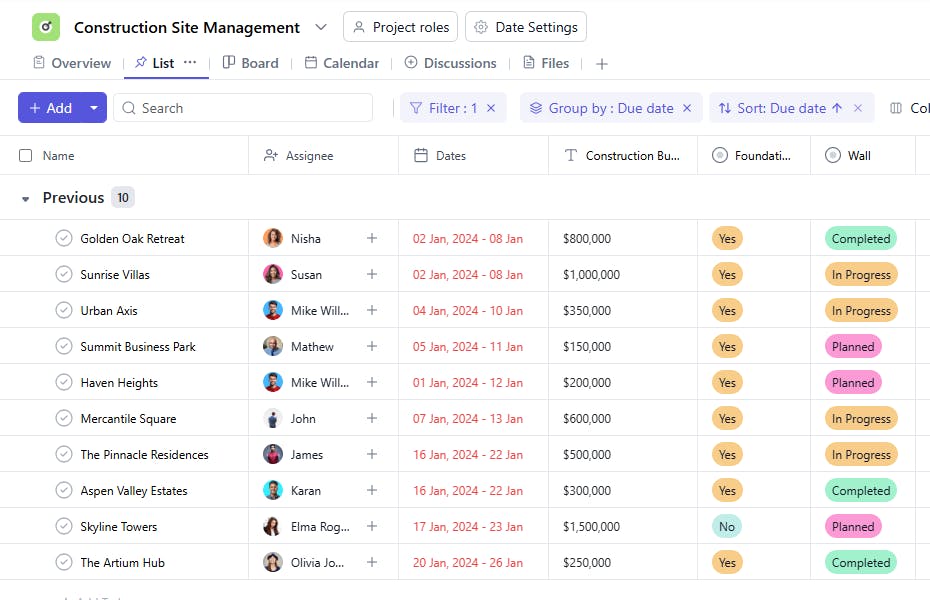
Slide 2 of 2 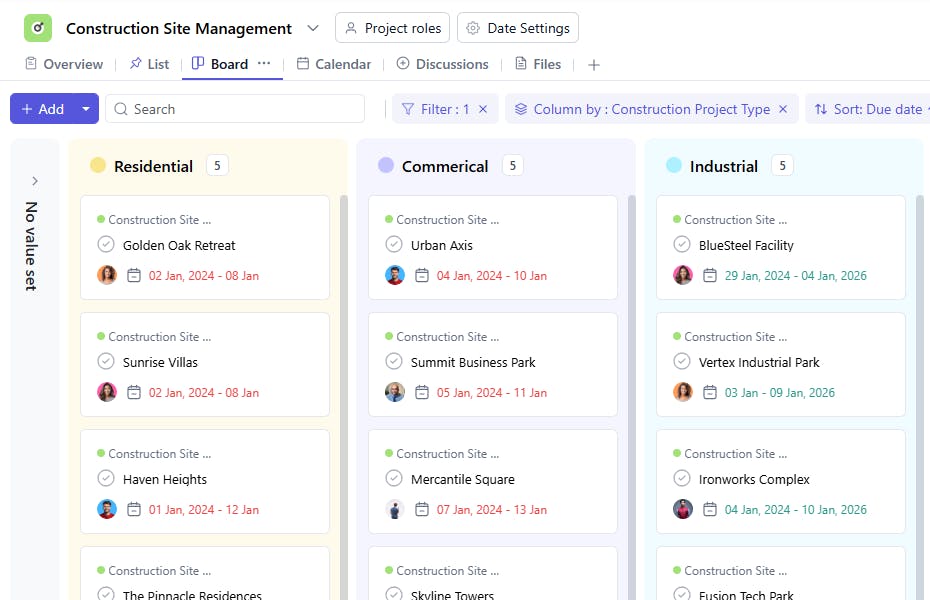
What is a Construction Site Management Template?
SmartTask’s Construction Site Management Template provides a consolidated overview of how multiple construction sites or phases are progressing.
Instead of tracking daily activities, it helps project managers and stakeholders monitor overall work completion, budget utilization, and phase-wise status (foundation, electrical, plumbing, roofing, etc.) to ensure projects move in sync with planned schedules.
Construction Site Management Template: Key Features
- Phase-Wise Progress Tracking
- Get visibility into completion levels across major work categories — foundation, superstructure, electrical, plumbing, and roofing.
- Multi-Site Oversight
- Monitor performance and progress across different locations or projects in one place.
- Budget vs. Progress Overview
- Compare estimated budgets with actual progress to quickly identify variances and potential overruns.
- Resource Allocation Summary
- Track which teams, subcontractors, or equipment are deployed where, without diving into daily details.
- Quality & Safety Overview
- Maintain high-level records of inspection outcomes, quality control results, and safety compliance across all sites.
- Milestone & Timeline Tracking
- View completion percentages against planned timelines for every major phase.
How to Use the Construction Site Management Template
- Set Up Project Details
- Add project name, client, location, and construction type (Residential, Commercial, or Industrial).
- Define Work Phases
- Break down the project into key phases such as foundation, structure, electrical, plumbing, and finishing.
- Update Progress Regularly
- Record percentage completion or current status (e.g., In Progress, Completed, Delayed) for each work category.
- Monitor Budgets & Costs
- Track high-level budget utilization and ensure each site remains within approved limits.
- Review Quality & Compliance
- Note key inspection results, permits, or certifications for each phase.
- Analyze Overall Site Health
- Use dashboards to compare sites, identify delays, and prioritize areas needing attention.
Key Custom Fields for Smarter Tracking
- Construction Project Type – Residential, Commercial, Industrial
- Construction Location – Site or city where work is being carried out
- Budget – Total or phase-wise allocation
- Foundation – % complete or current stage
- Electrical – Status of wiring and installations
- Plumbing – Status of piping and fittings
- Roofing – Status of roofing work
- QC (Quality Control) – Summary of inspection status or test approvals
Additional Customization Options
- Subcontractor Overview – Track subcontractor responsibilities and progress per phase.
- Weather Impact Log – Note weather conditions affecting timelines.
- Risk Register – Document key risks and mitigation measures.
- Permit Tracking – Manage critical approvals and compliance certificates.
- Change Management – Record and track approved design or scope changes.


