
Templates
CRE Site Visit Tracker
The CRE (Commercial Real Estate) Site Visit Tracker Template provides a structured approach to monitor property visits, manage tour details, and track client interest. This template ensures efficient organization, seamless communication, and effective follow-ups.
Use TemplateCategories
What is a CRE Site Visit Tracker Template?
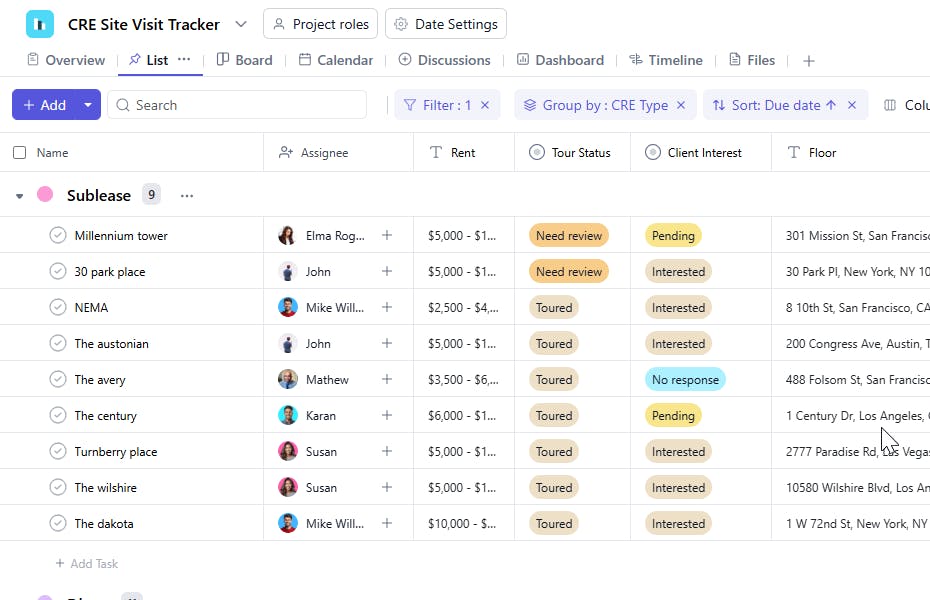
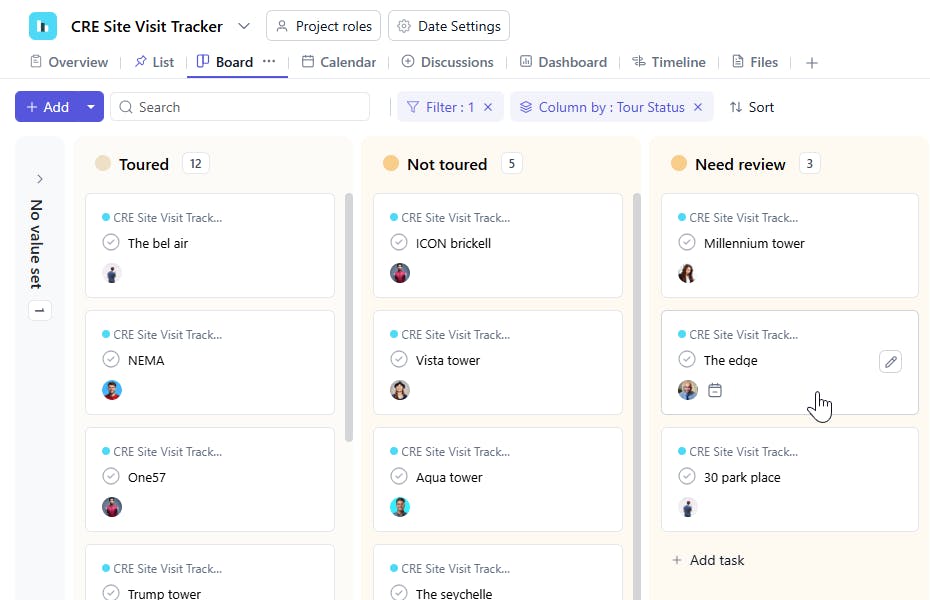
A CRE Site Visit Tracker Template is a tool designed to log and manage property site visits efficiently. It includes task names, floor levels, nearby submarkets, square footage, rent, availability dates, tour statuses, assignees, property types, and client interest levels. This ensures all site visits are documented and evaluated systematically to facilitate informed decision-making.
Here’s a closer look at its key features:
CRE Site Visit Tracker Template: Key Features
- Comprehensive Site Details: Track property information, including location, size, price, amenities, and specific requirements for each site visit.
- Client-Specific Preferences: Record client preferences and feedback, such as specific property features or potential adjustments, to ensure personalized service during visits.
- Visit Scheduling & Coordination: Manage the scheduling and logistics for each site visit, ensuring clients are available and all necessary parties are informed.
- Collaborative Task Management: Assign responsibilities, update task statuses, and coordinate with team members for a smooth site visit process.
- Automated Notifications: Set up reminders for upcoming visits, follow-up tasks, and other key actions to ensure no details are overlooked.
How to Use the CRE Site Visit Tracker Template
Here’s a simple guide to using SmartTask’s CRE Site Visit Tracker Template:
- Choose and Customize: Select the CRE Site Visit Tracker template from SmartTask’s template library. Tailor the fields to your needs, such as adding site details, visit scheduling, and client-specific information.
- Enter Site & Client Details: Start by entering key details for each site, including location, size, amenities, and property features. Add client preferences and specific requirements.
- Schedule Visits: Organize site visit dates, including start and end times, and assign responsibilities to team members. Make sure all logistics are set up.
- Track Tasks & Updates: Assign tasks related to the site visit, such as preparing documents, coordinating transportation, or following up with the client. Monitor real-time progress.
- Collect Feedback & Next Steps: After each site visit, collect feedback from clients and update the tracker accordingly. Set follow-up tasks or schedule additional visits if necessary.
Custom Fields for Enhanced Organization
This CRE Site Visit Tracker Template includes the following fields for detailed tracking and organization:
- Task Name: A brief description of the site visit task.
- Floor: The floor level of the property being visited.
- Nearby Submarket: Notable submarkets or districts near the property.
- SQFT: The size of the property in square feet.
- Rent: The rental rate of the property.
- Date Available: The date the property will be ready for leasing.
- Tour Status: Scheduled, Completed, Canceled
- Assignee: The person responsible for managing the site visit task.
- Type: Office, Retail, Industrial
- Client Interest: High, Medium, Low
Additional Customization Options
Here are a few ways to further customize the CRE Site Visit Tracker Template:
- Priority Levels: Add a field to prioritize site visits based on urgency or client importance.
- Broker Contact: Include broker details for quick communication.
- Inspection Dates: Add a field to schedule property inspections if needed.
- Photos/Media Links: Attach property images or video walkthroughs for client review.
- Notes/Comments: Add a section for additional observations or feedback during the site visit.


