
Templates
Create Brand Style Guide
The Brand Style Guide Template ensures that the process of developing, updating, and maintaining the brand style guide is managed efficiently and consistently, leading to a unified and professional brand identity.
Use Template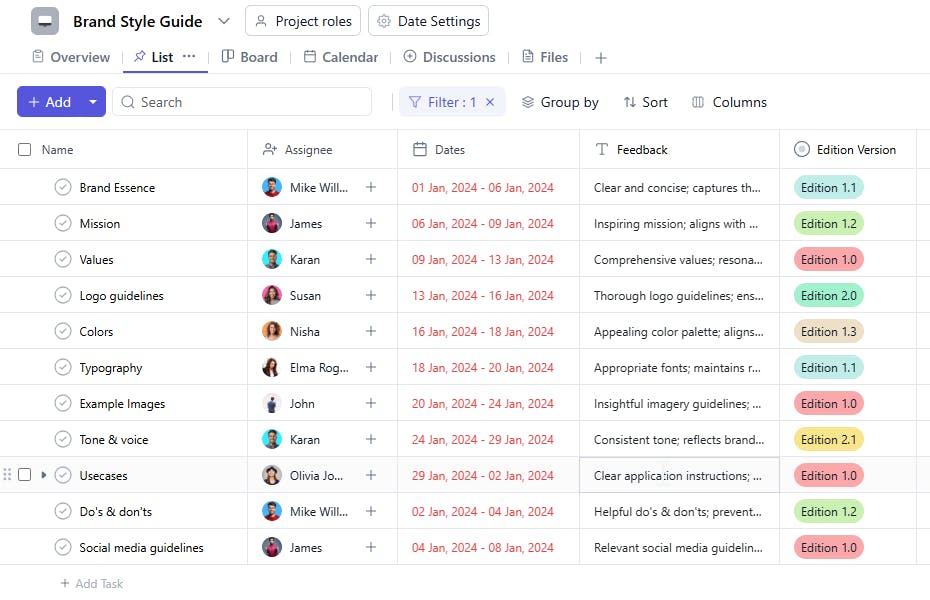
What is a Brand Style Guide Template?
A Brand Style Guide Template is a tool designed to help teams create, update, and maintain a consistent branding strategy. It includes asset as taskname, assignees, feedback, edition versions, changes required, due dates, and descriptions. This template ensures that all aspects of brand identity are properly documented, approved, and communicated to stakeholders for consistent usage.
Here’s a closer look at its key features:
Brand Style Guide Template: Key Features
- Brand Element Management: Track and organize key components of your brand, including logos, colors, fonts, and imagery, to maintain visual consistency.
- Content Tone and Voice Guidelines: Define the tone of voice, language style, and messaging to ensure your communications align with your brand’s personality.
- Document and Asset Storage: Store important brand assets like logo files, typography guidelines, and imagery resources in one centralized location.
- Collaboration and Review: Work with your team and stakeholders to review and refine brand guidelines to ensure clarity and consistency across all platforms.
- Version Control: Manage and track changes to the brand style guide to maintain a current and updated version at all times.
How to Use the Brand Style Guide Template?
Here’s a simple guide to using SmartTask’s Brand Style Guide Template:
- Define Brand Elements: Start by adding core brand elements such as logos, color schemes, and typography. Assign specific guidelines for their usage.
- Set Content Tone & Voice: Outline how your brand should communicate through text. Define key terms, style preferences, and tone (formal, casual, etc.).
- Store Brand Assets: Upload key brand assets (logos, images, fonts) for easy access by your marketing team or collaborators.
- Review and Approve: Assign team members to review and approve the style guide sections, ensuring it’s accurate and aligned with brand goals.
- Track Updates: Set deadlines and track updates to the style guide to ensure all marketing materials align with the most current brand standards.
Custom Fields for Enhanced Organization
This Brand Style Guide Template includes the following fields for detailed task management and tracking:
- Edition Version: The version number of the brand guide for tracking updates.
- Changes Required: Specific changes or updates needed after receiving feedback.
- Feedback: Feedback about the created brand guide.
Additional Customization Options
Here are a few ways to further customize the Create Brand Style Guide Template:
- Approval Status: Add a field to track the approval process for each section of the guide.
- Brand Guidelines: Include a section for specific brand guidelines such as typography, color schemes, and logos.
- Usage Instructions: Add guidelines on how the brand elements should be used across various platforms (e.g., digital, print).
- Legal Considerations: Include any legal requirements or restrictions that may affect the brand’s use.
- Stakeholder Review: Add a field to track who needs to review or approve the guide at various stages.


