
Templates
Employee Database
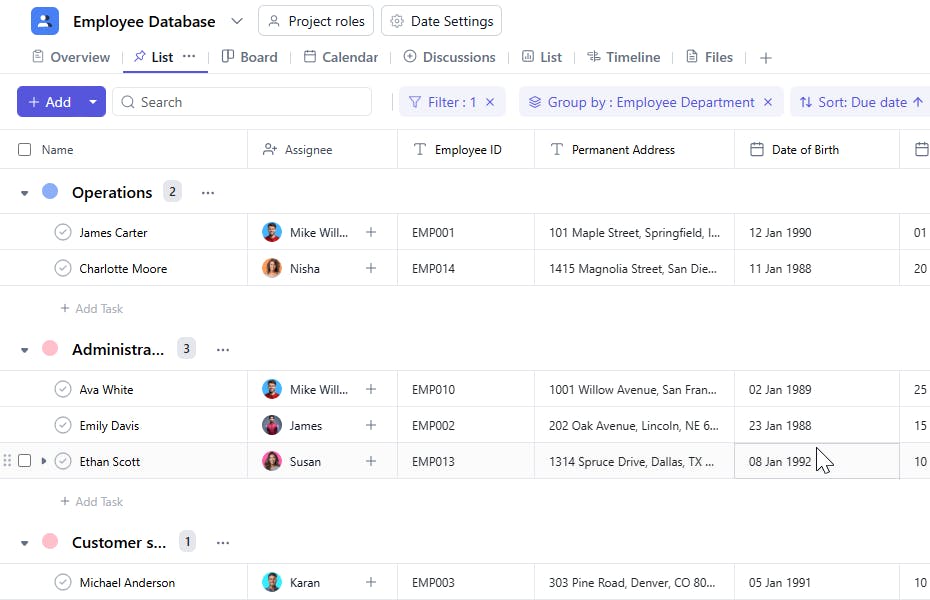
The Employee Database Template provides an organized framework for managing and tracking employee details, ensuring easy access to critical information and efficient human resource management.
Use TemplateCategories
What is an Employee Database Template?
An Employee Database Template serves as a comprehensive record-keeping tool for storing essential employee information. It streamlines data organization, helps track employee details, and provides quick access to key information for HR and administrative purposes.
Here’s a closer look at its key features:
Employee Database Template: Key Features
- Comprehensive Employee Information: The template allows you to capture detailed data such as names, roles, departments, contact information, and employment history.
- Seamless Collaboration: HR teams, managers, and other stakeholders can easily collaborate, updating and reviewing employee data in real-time.
- Customizable Fields: Tailor the template to include specific data points that are relevant to your organization's needs, such as performance reviews or training records.
How to Use the Employee Database Template?
Here’s a step-by-step guide to using the Employee Database Template:
- Create a New Project: Log into SmartTask, click "New Project," and select the Employee Database template.
- Tailor to Your Needs: Customize the template to include fields relevant to your organization, such as job titles, department, or special training.
- Add Employee Information: Enter or import employee data, including personal details, job roles, and work history.
- Organize and Categorize: Use custom fields to categorize employees by department, team, or performance ratings, ensuring easy retrieval of data.
- Collaborate with HR Teams: Share updates, feedback, and documents related to employees' records with the relevant stakeholders.
- Track and Monitor: Use built-in tools to track employee performance, compliance, training, and other key metrics.
Custom Fields for Enhanced Organization
This Employee Database Template includes the following fields for better tracking and management:
- Personal Mail ID: Employee’s personal email address.
- Company Mail ID: Official company-assigned email address.
- Employee ID: Unique identifier assigned to each employee.
- Position: The role or designation of the employee in the company.
- Department: The department to which the employee belongs.
- Join Date: The date the employee joined the organization.
- Date of Birth: The employee’s birthdate for record purposes.
- Blood Group: Employee’s blood group for emergency reference.
- Permanent Address: Employee’s residential address.
- Employment Type: Full-Time, Part-Time, or Contractor.
Additional Customization Options
Here are a few ways to further customize the Employee Database Template:
- Employee Status: Add a field to track employment status (e.g., Active, Resigned, On Leave).
- Emergency Contact: Include a field for emergency contact details.
- Salary Information: Add a section to store salary and benefits information.
- Performance Reviews: Include a section to track periodic performance reviews.
- Document Upload: Add a section for uploading scanned documents like ID proofs or resumes.


