
Templates
Event Registration Form
The Event Registration Form Template is a highly effective tool for managing event attendees, ensuring that all necessary details are collected, tracked, and organized for a smooth and successful event.
Use TemplateCategories
What is an Event Registration Form Template?
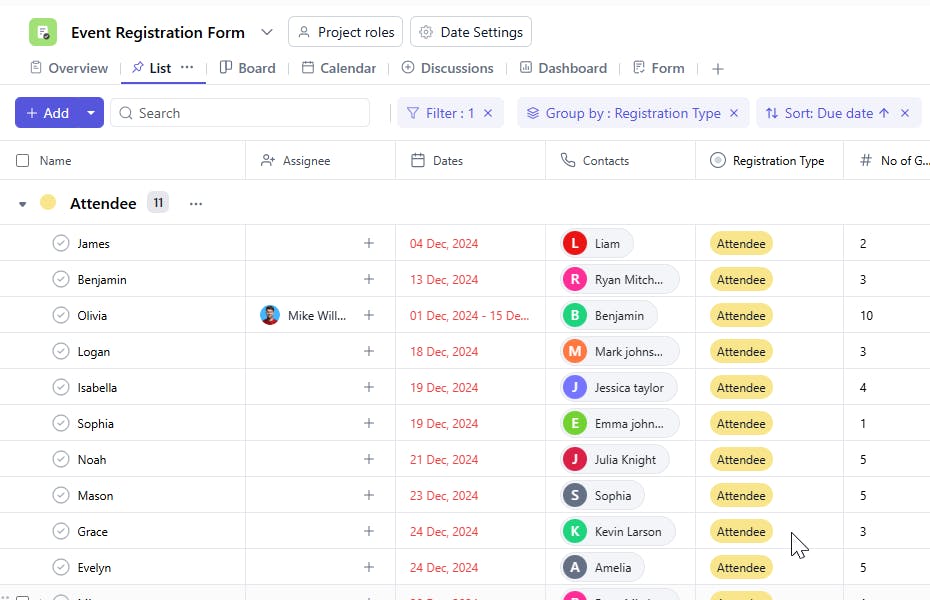
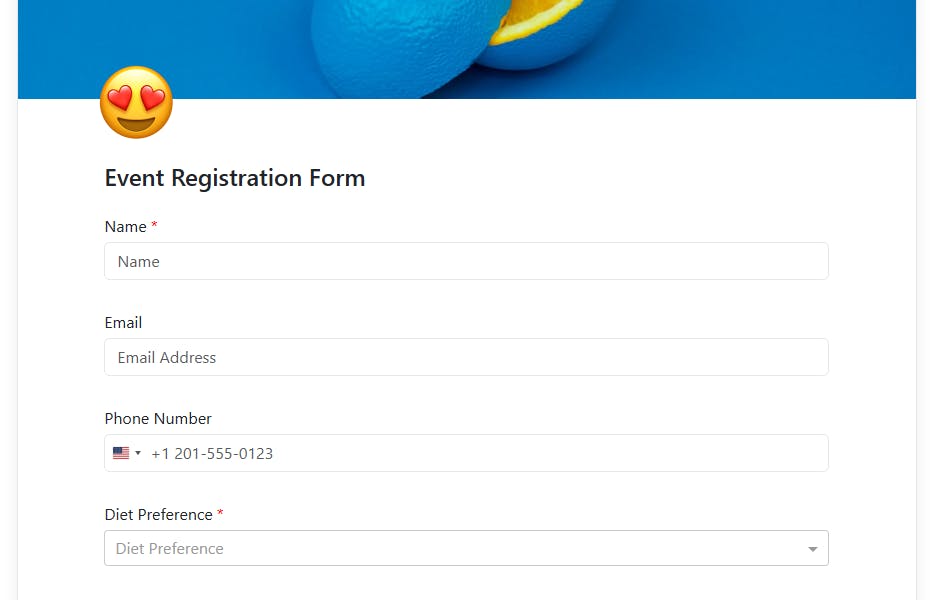
An Event Registration Form Template provides a structured format to collect detailed information from attendees, including personal details, payment statuses, and special requests. It ensures that event organizers have a comprehensive overview of all participants and their requirements, facilitating better event management and customer service. And since the form directly creates tasks in SmartTask, the process is fully automated and hassle-free.
Here’s a closer look at its key features:
Event Registration Form Template: Key Features
- Streamlined Data Collection: Collect all the necessary details like name, contact information, dietary preferences, and special requests in one place.
- Customizable Fields: Tailor the form fields to meet the specific needs of your event, ensuring you capture the right information.
- Easy-to-Use Interface: The template is easy to navigate, making it simple for attendees to register and for organizers to track submissions.
- Real-Time Updates: Get instant notifications when a new registration is submitted, so you can keep track of attendance and make timely adjustments.
- Automated Task Creation: Each submission automatically becomes a task in SmartTask, saving time and avoiding manual data entry.
How to Use the Event Registration Form Template?
Here’s a step-by-step guide to using SmartTask’s Event Registration Form Template:
- Create a New Event: Log into SmartTask, click "New Project," and select the Event Registration Form template to begin.
- Customize the Form: Modify the fields to collect the specific information you need, such as name, email, job title, or preferences for event sessions.
- Publish the Form: Once the form is ready, share it with your attendees through email, website links, or social media channels.
- Track Registrations: Monitor incoming submissions in real-time, ensuring you stay up to date with the number of attendees and any special requests.
- Send Confirmation: Use automated tools to send confirmation emails or messages to attendees, providing them with event details and additional instructions.
Custom Fields for Enhanced Organization
This Event Registration Form Template includes the following fields for better participant tracking and event planning:
- Task Name: The name of the task or event being registered for.
- No of Guests (Excluding You): The number of additional guests the participant will bring to the event.
- Mail ID: The email address for the participant to send event details and updates.
- Registered Date: The date the participant registered for the event.
- Diet Preference: Vegetarian, Non-Vegetarian, Vegan.
- Accommodation: Hotel, On-site, None
- Registration Type: VIP, General Admission
- Payment Status: Paid, Pending, Unpaid
- Reference: Any reference for tracking
- Special Request: Special requirements such as accessibility needs, seating preferences, etc.
- Communication: Email, Phone, Text
Additional Customization Options
Here are a few ways to further customize the Event Registration Form Template:
- Automated Reminders: Set automated reminders for attendees regarding payment deadlines, registration confirmation, or event updates.
- Guest List Management: Maintain an organized guest list with detailed breakdowns by registration type, payment status, etc.
- Performance Tracking: Add fields to track the number of registered attendees, cancellations, or changes.
- Custom Fields: Add custom fields for unique event requirements, such as specific sessions or activities.
- File Attachments: Attach event-related documents such as itineraries, tickets, or event brochures.


