
Templates
Event Venue
Selecting the perfect venue is key to a memorable event, it sets the tone, shapes the experience, and leaves a lasting impression.
Use TemplateCategories
What is the Event Venue Template?
The Event Venue Template is designed to help you evaluate and select the perfect venue for your event. By organizing critical details such as capacity, amenities, location, and budget, it simplifies the decision-making process and ensures you make an informed choice.
Here’s a closer look at its key features:
Event Venue Template: Key Features
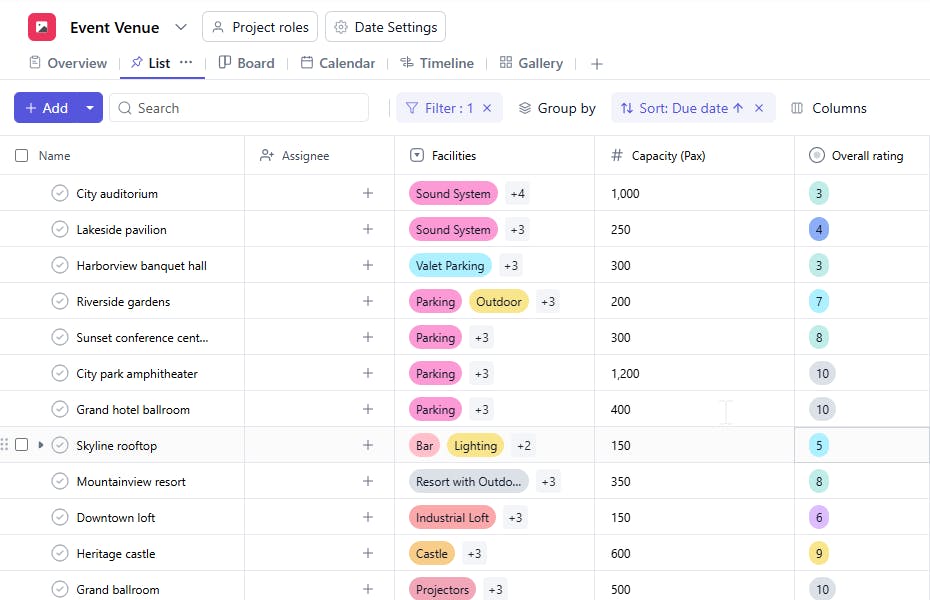
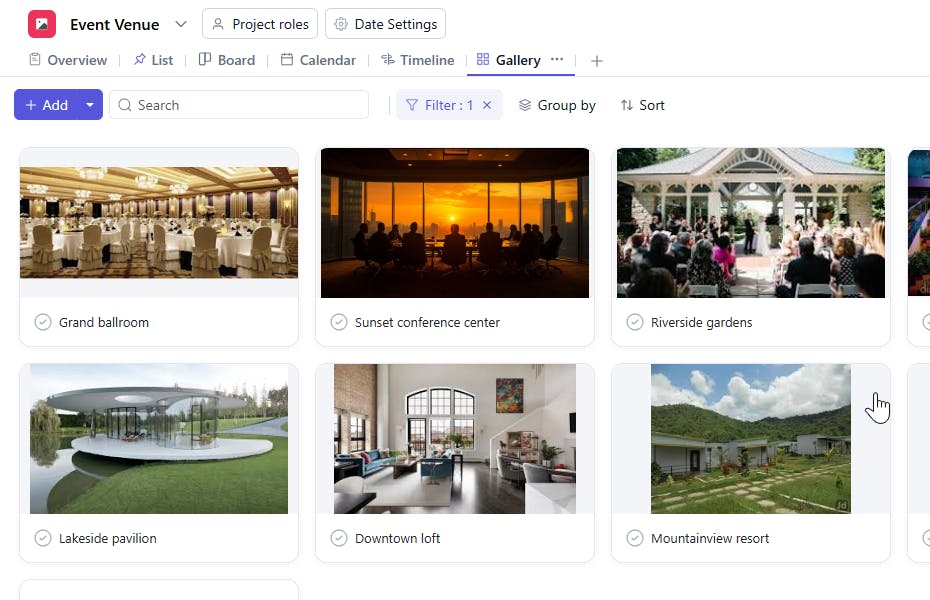
- Comprehensive Venue Evaluation: Capture key details about each venue, including capacity, available services, location, and price. Compare multiple venues side-by-side to choose the best fit for your event.
- Streamlined Booking Process: Track booking details, contracts, and payment schedules with ease, ensuring you stay on top of all necessary tasks.
- Real-Time Collaboration: Keep your team aligned with shared updates on venue selection, booking, and contract management, ensuring everyone is informed and on track.
- Automated Reminders: Built-in reminders for important dates like contract deadlines, payments, and venue visits ensure you never miss a step.
How to Use the Event Venue Template
Here’s a step-by-step guide to using the Event Venue Template:
- Create and Customize: Log into SmartTask, set up a new project for your event, and select the "Event Venue" template. Customize the template to include your specific venue criteria, such as capacity, budget, location, and facilities.
- Research and Add Venues: Start adding venues to your project. Enter key details such as contact information, pricing, availability, and any additional services offered.
- Compare Options: Use the side-by-side comparison feature to evaluate multiple venues based on critical factors like cost, services, and capacity, helping you make an informed decision faster.
- Finalize Booking: Once you’ve selected your venue, track contracts, payment schedules, and other key details. Set automated reminders to stay on top of deadlines and milestones.
- Keep Everything on Track: Update the template as needed and ensure that all team members stay informed throughout the planning and booking process.
Custom Fields for Enhanced Organization
The Event Venue Template includes several custom fields to ensure you can capture all the relevant details specific to your venue selection:
- Capacity: The Number of people the venue can accommodate
- Price: Total price for the venue
- Facilities: Stage, parking, ballroom. catering area, bar, outdoor stage, AV screening
- Venue Type: Outdoor garden, Indoor loft, Conference center, historical castle, Indoor auditorium, Indoor banquet hall.
- Food Rating: Excellent, Average, Good
- Overall Rating: 1 to 10
- Holiday Destination: Yes, No
Additional Customization Options
Take your Event Venue Template even further with these customization options:
- Adjust your criteria: Add custom fields to reflect specific venue requirements, such as accessibility features or unique services.
- Set up automated reminders: Customize notifications for key deadlines, including contract signing and payment due dates.
- Collaborate in real-time: Use SmartTask’s collaboration features to keep your team informed and aligned, whether through comments, chat, or video calls.
- Track additional feedback: Gather insights from team members or venue contacts to refine your decision-making process.
The Event Venue Template simplifies the complex task of venue selection and booking, helping you make smarter decisions with ease. Ready to get started? Let SmartTask help you find the perfect venue for your next event.


