
Templates
Film Budget
The Film Budget Template helps manage and track the financial aspects of a film production, ensuring expenses are controlled, and the project stays within budget.
Use TemplateCategories
Slide 1 of 2 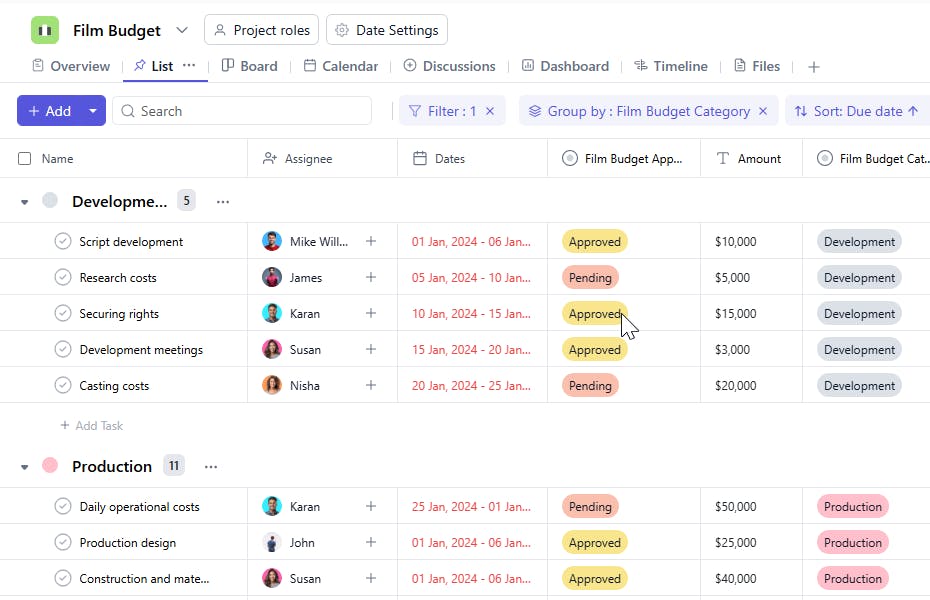
Slide 2 of 2 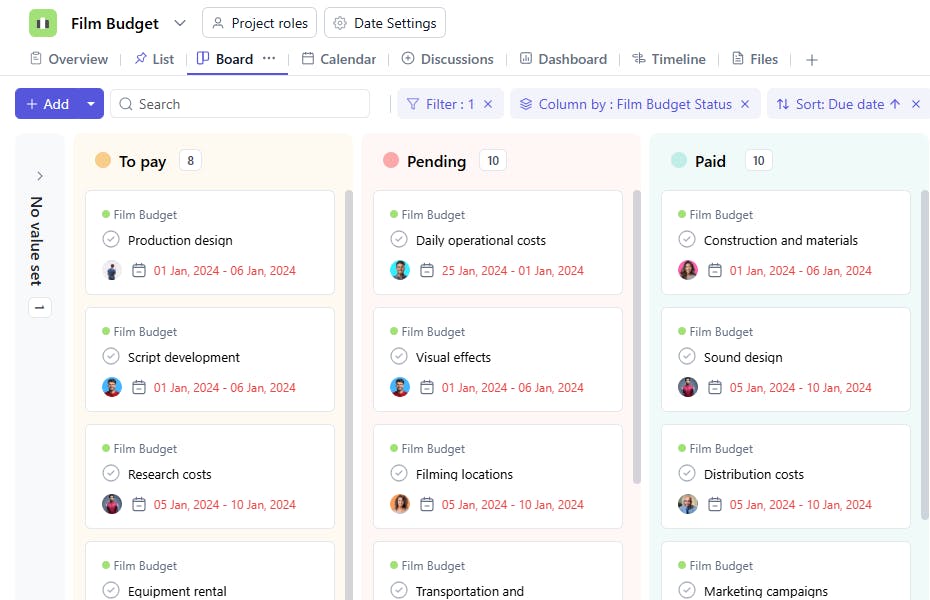
What is a Film Budget Template?
A Film Budget Template is a tool designed to organize and monitor the financial details of a film project. It includes task names, categories, assignees, amounts, approval statuses, and dates. This template ensures that all financial tasks are managed efficiently, and all expenses are properly tracked and approved.
Film Budget Template: Key Features
- Detailed Budget Tracking: Organize all the financial details of the film, from pre-production to post-production, ensuring that each area is properly funded.
- Expense Categorization: Break down costs into specific categories such as cast and crew salaries, equipment rentals, location fees, and post-production costs.
- Timeline Management: Track when costs will be incurred throughout the production process, helping to manage cash flow and keep production on schedule.
- Collaboration and Approval: Enable team members and stakeholders to review the budget, make adjustments, and approve expenses.
- Cost Monitoring: Keep track of actual spending against the budget to ensure you stay within financial constraints.
How to Use the Film Budget Template?
Here’s a step-by-step guide to using the Film Budget Template:
- Capture Budget Details: Start by listing all major budget categories like “Pre-Production,” “Salaries,” “Equipment,” “Location Fees,” and “Post-Production.”
- Breakdown Expenses: For each category, input the estimated costs and assign tasks for gathering quotes, purchasing, or renting items.
- Track Spending: As expenses are incurred, update the budget with actual costs, ensuring that you're staying within the allocated amounts.
- Review and Approve: Set up approval processes for larger expenses to ensure proper checks and balances.
- Monitor Timeline: Track when each expense is expected to occur to manage cash flow and ensure timely payments.
- Finalize and Adjust: Once production is completed, finalize the budget and make necessary adjustments based on actual expenditures.
Custom Fields for Enhanced Organization
- Category: Development, Production & Post- Production
- Amount: The estimated or actual amount allocated for the task.
- Approval: Track whether the item has been approved by relevant stakeholders.
- Status: The current progress of the budget item (e.g., To pay, Paid, Pending).
Additional Customization Options
- Payment Schedule: Add a section to track the payment schedule for each budget item.
- Expense Type: Include a field to track whether an expense is essential, optional, or contingent.
- Cost Comparison: Track the difference between estimated and actual costs.


