
Templates
Grants Management
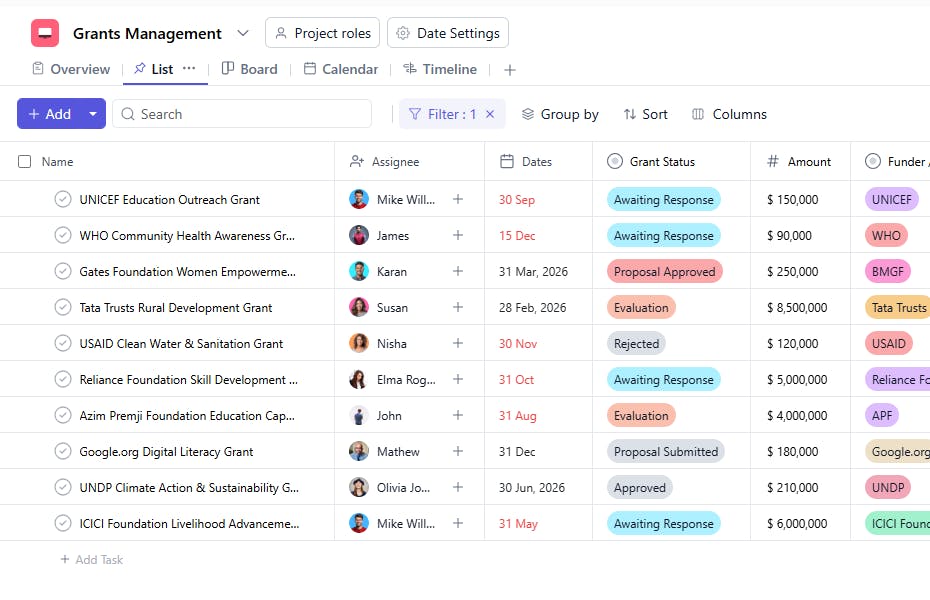
The Grants Management Template is designed to help organizations such as NGOs, non-profits, and incubators systematically track and manage all past grants in one place. It provides a structured way to capture key grant details including funding information, responsible owners, reporting requirements, and risk levels, ensuring transparency, accountability, and easy access for audits or future planning. This template enables teams to maintain complete historical data for each grant, analyze past performance, and identify funders or donors for potential renewal or long-term collaboration.
Use TemplateCategories
What is a Grants Management Template?
A Grants Management Template serves as a centralized record of all completed or closed grants. Each task represents an individual grant and documents important information such as the grant period, funding amount, donor details, reporting frequency, and overall risk.
By organizing this information in a consistent format, teams can review outcomes, track compliance history, and make informed decisions when planning future grant applications.
Grants Management Template: Key Features
- Centralized Grant Records: Maintain all past grant information in a single, structured workspace.
- Clear Ownership: Assign each grant to a responsible team member (Assignee) for documentation and reference.
- Timeline Tracking: Capture grant durations using the Dates field.
- Financial Visibility: Record the Amount received for each grant.
- Donor Reference: Maintain a clear record of Funder / Donor details for future engagement.
- Reporting Clarity: Track Reporting Frequency to understand compliance requirements.
- Risk Assessment: Use Risk Level to evaluate complexity or dependency for future planning.
- Status Visibility: Update Grant Status to reflect closure or renewal consideration.
How to Use the Grants Management Template
- Create a Task for Each Grant: Use the Name field to record the grant or project title.
- Assign Responsibility: Select an Assignee to manage records and documentation.
- Add Grant Duration: Enter the grant period under Dates.
- Update Grant Status: Mark the Grant Status as Completed, Closed, or Pending Renewal.
- Record Funding Details: Add the Amount and corresponding Funder / Donor.
- Set Reporting Requirements: Define the Reporting Frequency followed during the grant lifecycle.
- Assess Risk: Select an appropriate Risk Level for internal evaluation.
Custom Fields for Enhanced Organization
This Grants Management Template includes the following fields to support structured tracking and analysis:
- Grant Status – Indicates the current or final state of the grant (Completed, Closed, Pending Renewal).
- Amount – Total funding received.
- Funder / Donor – Source of funding.
- Reporting Frequency – Required reporting cadence.
- Risk Level – Internal risk classification.


