
Templates
Integration Prioritization & Evaluation
An Integration Evaluation Template is a strategic tool used by product teams to analyze which integrations are worth building. It includes fields like effort estimation, customer demand, business alignment, and projected impact to help teams make objective prioritization decisions. This ensures the team selects integrations systematically and supports the overall product roadmap.
Use TemplateCategories
Slide 1 of 1 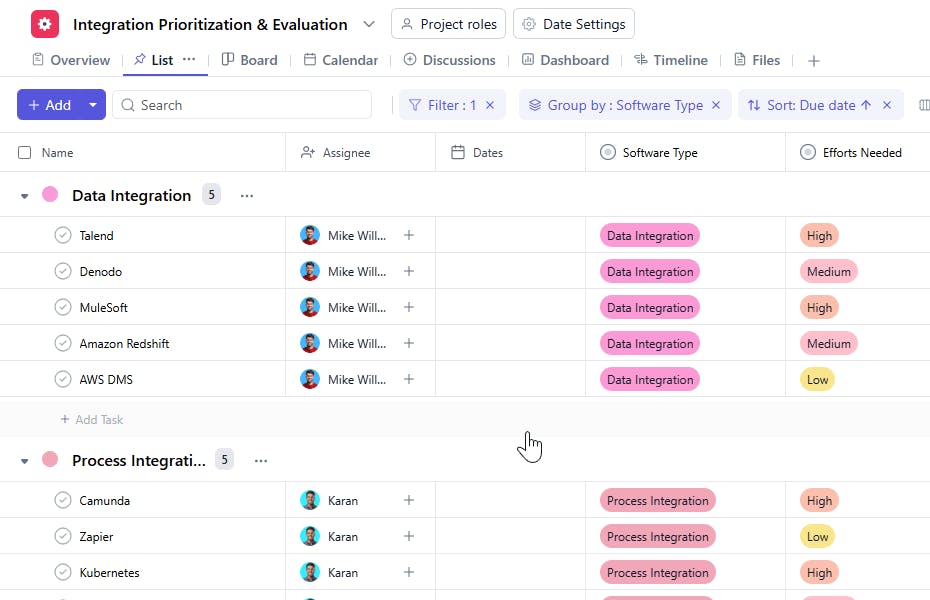
Integration Evaluation Template: Key Features
- Detailed Integration Assessment: Document each potential integration along with APIs, technical feasibility, authentication requirements, and estimated engineering effort.
- Impact & Demand Analysis: Evaluate the business value of each integration by assessing customer demand, market expectations, and potential growth impact.
- Strategic Alignment Scoring: Check how well each integration aligns with company vision, ICP needs, and competitive positioning.
- Cross-Team Visibility: Assign PMs, engineers, and stakeholders while maintaining clarity around evaluation status and next steps.
- Prioritization Automation: Use fields and formulas to auto-calculate total priority scores and compare potential integrations.
How to Use the Integration Evaluation Template
Here’s a step-by-step guide to using SmartTask’s Integration Evaluation Template for your next product planning cycle:
- Choose and Customize
- Select the Integration Evaluation Template from SmartTask’s template library. Customize fields for effort scoring, impact ratings, demand metrics, and alignment scoring.
- Document Each Integration Opportunity
- Begin by listing all requested or strategic integrations - along with notes on API availability, technical feasibility, and dependencies.
- Assign Responsibilities
- Delegate evaluation tasks such as API research, customer demand analysis, and effort estimation to relevant PMs or engineers. Track progress in real time.
- Score Impact, Demand, Alignment & Effort
- Use predefined scoring criteria to rate each integration. This creates an objective prioritization framework.
- Review, Prioritize & Finalize Roadmap
- Compare weighted priority scores, identify top candidates, and move selected integrations to the roadmap. Track development and release using built-in status fields.
Custom Fields for Enhanced Evaluation
This Integration Evaluation Template includes the following fields for better prioritization and decision-making:
- Effort Needed: Estimated engineering effort.
- Impact: Expected boost to adoption, retention, or revenue.
- Demand: Number of customer requests or deal influence.
- Alignment: Fit with company strategy and ICP needs.
- Integration Status: Not Started, Evaluating, In Progress, Beta, Released.
- Integration Type: CRM, Payments, Marketing, Communication, etc.
Additional Customization Options
Here are a few ways to further customize the Integration Evaluation Template:
- Priority Score: Auto-calculated rating based on weighted scoring.
- Risks & Unknowns: Capture integration blockers or uncertainty.
- API Documentation Link: Add URLs for deeper technical review.
- Resources Needed: Estimate team members, design involvement, GTM needs.
- Dependencies: Note other features, integrations, or technical components required before development.


