
Templates
IT Security Policies
The IT Security Policies Template ensures an organized approach to policy creation, tracking, and compliance, supporting a secure and resilient IT environment.
Use TemplateCategories
What is an IT Security Policies Template?
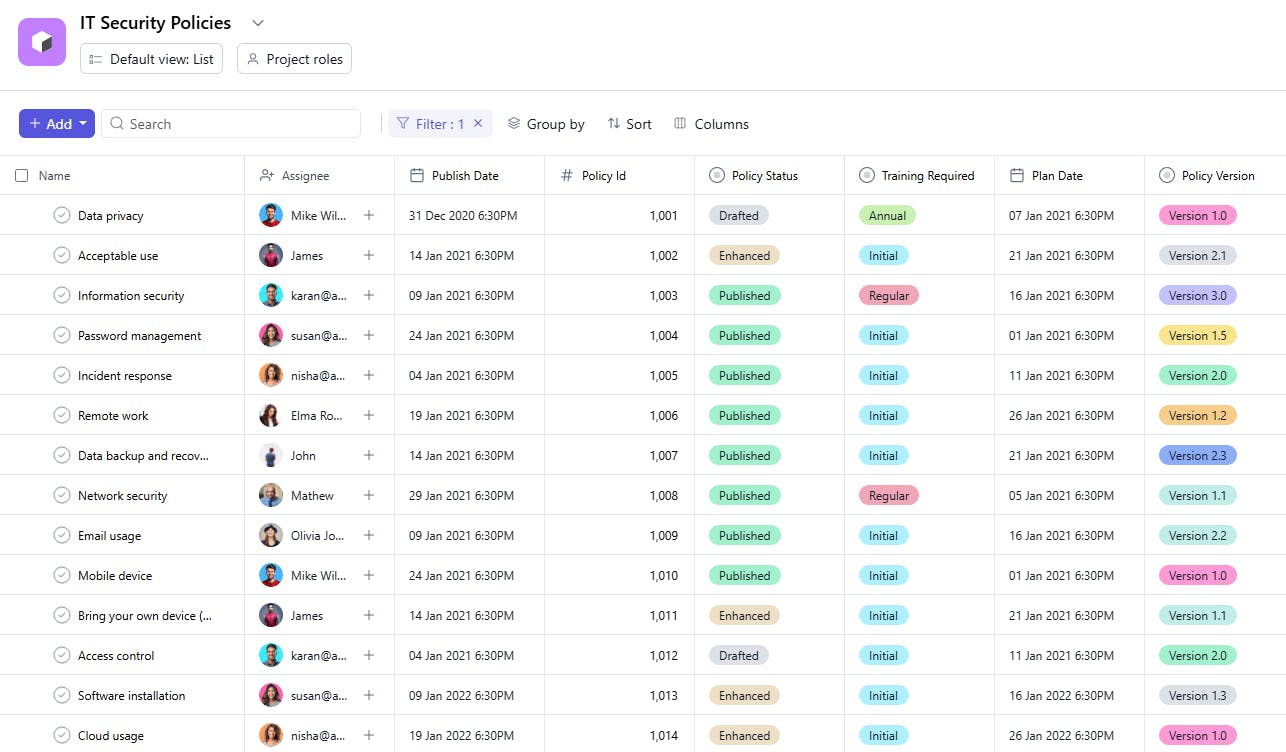
An IT Security Policies Template is a tool designed to track the creation, implementation, and maintenance of IT security policies. It includes task names, policy IDs, policy statuses, publish dates, assignees, descriptions, policy versions, training details, and plan dates. This template helps organizations maintain robust security practices and ensures regulatory compliance.
Here’s a closer look at its key features:
IT Security Policies Template: Key Features
- Policy Organization: Centralize all your security policies in one place, making them easily accessible and organized.
- Compliance Tracking: Ensure policies are aligned with legal and regulatory requirements, and monitor compliance across your organization.
- Real-Time Collaboration: Work with your team to update, review, and enforce policies, ensuring everyone stays on the same page.
- Automated Notifications: Get automated reminders for policy reviews, updates, and deadlines, ensuring timely implementation.
How to Use the IT Security Policies Template
Here’s a simple guide to getting started with the IT Security Policies Template:
- Select & Customize the Template: Choose the IT security policies template from your project management tool, or tailor it to meet the specific needs of your organization.
- Define Security Policies: Outline key security protocols and policies, such as password management, encryption, network security, and data access control.
- Assign Ownership & Deadlines: Assign responsible team members for each policy, set deadlines for reviews, and ensure ongoing policy enforcement.
- Automate Reminders & Reviews: Set up automatic reminders for policy updates, periodic reviews, and team training sessions.
- Monitor & Audit: Use built-in tools to track compliance, evaluate policy effectiveness, and make adjustments as needed.
Custom Fields for Enhanced Organization
This IT Security Policies Template includes the following fields for detailed management and tracking:
- Policy ID: A unique identifier for each security policy.
- Policy Status: The current state of the policy (e.g., Draft, Approved, Published).
- Publish Date: The date when the policy is officially released.
- Policy Version: The version number to track updates.
- Training: Indicates if training is required for the policy.
Additional Customization Options
Here are a few ways to further customize the IT Security Policies Template:
- Review Frequency: Add a field for scheduled review intervals (e.g., Quarterly, Annually).
- Compliance Standards: Include a section to link policies to relevant standards (e.g., ISO 27001).
- Approval Status: Add a column to document approvals from key stakeholders.
- Audit Logs: Track changes or updates made to the policy.
- Document Links: Include links to the full policy document for easy reference.


