
Templates
Itinerary Approval
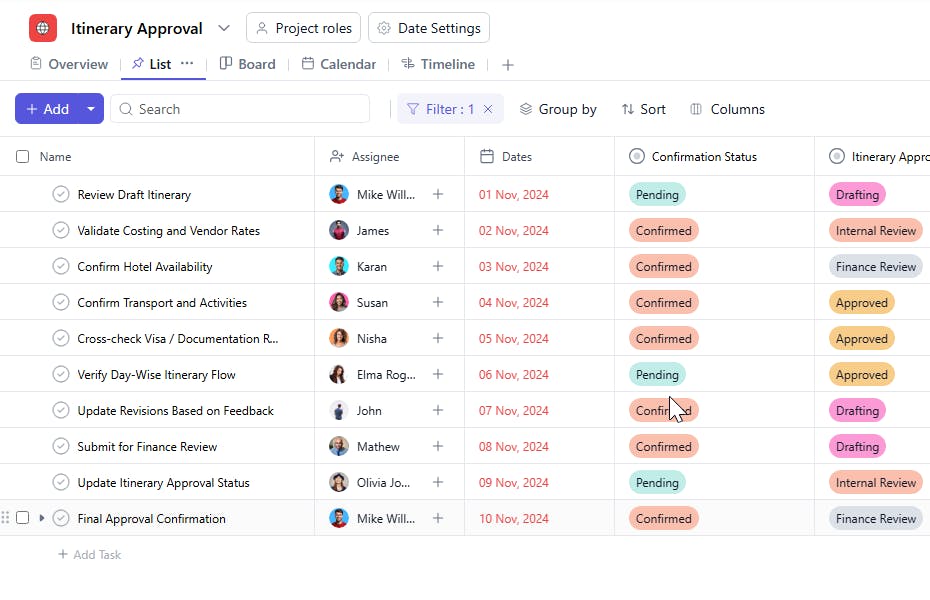
The Itinerary Approvals Template provides a structured system to manage, review, and approve travel itineraries for business trips, client visits, or internal travel. This template ensures seamless coordination between travel coordinators, employees, and management while maintaining transparency and timely approvals throughout the process.
Use TemplateCategories
What is an Itinerary Approvals Template?
An Itinerary Approvals Template is a workflow tool designed to streamline the travel planning and approval process within an organization. It enables teams to manage travel requests, track approval stages, confirm bookings, and monitor trip completion in one centralized space.
Each itinerary moves through well-defined approval stages — from request submission to confirmation — ensuring all travel activities are properly documented and authorized before execution.
Here’s a closer look at its key features:
Itinerary Approvals Template: Key Features
- Structured Approval Workflow: Manage all travel requests through distinct stages such as Requested, Under Review, Approved, Booked, and Completed.
- Centralized Communication: Keep all travel details, including destinations, dates, and confirmations, in one shared space accessible to all stakeholders.
- Real-Time Tracking: Track each request’s approval status and stay informed about pending or completed actions.
- Collaborative Coordination: Assign travel-related tasks to coordinators or managers, ensuring responsibilities are clearly defined.
- Timely Execution: Set clear start and due dates for each itinerary task to prevent last-minute travel issues.
How to Use the Itinerary Approvals Template
- Add New Itinerary Requests: Create a task for each travel itinerary requiring approval and fill in essential travel details.
- Assign Responsibility: Designate the employee or travel coordinator responsible for managing the itinerary.
- Define Start and Due Dates: Indicate the travel start and return dates or approval deadlines for timely processing.
- Track Approval Stages: Move tasks across stages like Requested, In Review, Approved, Booked, and Completed.
- Monitor Confirmation Status: Update confirmation details once travel bookings or accommodations are finalized.
- Review and Archive: Once the trip is completed, review the itinerary and archive it for future reference or reporting.
Custom Fields for Enhanced Organization
This Itinerary Approvals Template includes the following custom fields for detailed tracking and management:
- Task Name: The name of the itinerary or travel request (e.g., “Client Visit to Mumbai” or “Sales Conference in Delhi”).
- Assignee: The person responsible for managing or approving the itinerary.
- Start Date: The beginning date of the itinerary or travel request.
- Due Date: The final date by which approval or confirmation is expected.
- Itinerary Approval Stage: Indicates the current stage in the approval process — Requested, In Review, Approved, Booked, or Completed.
- Confirmation Status: Displays whether the itinerary or booking has been Pending, Confirmed, or Cancelled.
Additional Customization Options
You can further customize the Itinerary Approvals Template by adding:
- Travel Destination: To specify the location of the trip.
- Travel Type: Domestic or International.
- Mode of Travel: Air, Train, or Road.
- Estimated Cost: For budgeting and approval tracking.
- Purpose of Visit: To document the objective of the trip for reference and reporting.


