
Templates
Marketing Budget
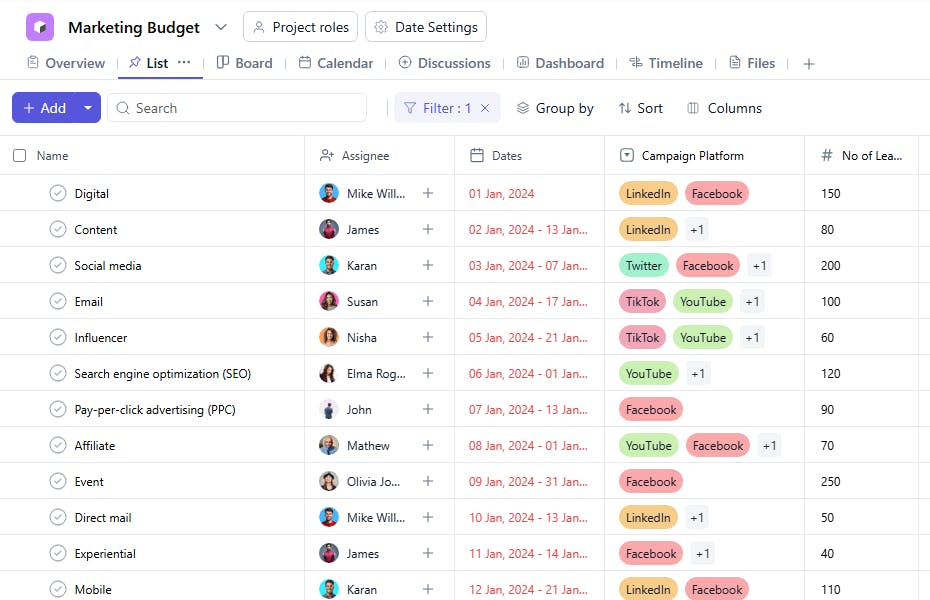
The Marketing Budget Template is an essential tool for tracking and optimizing marketing campaigns, ensuring that every campaign is cost-effective and generates a positive return on investment.
Use TemplateCategories
What is a Marketing Budget Template?
A Marketing Budget Template provides a structured framework for tracking all the financial aspects of marketing campaigns. It helps to assign tasks, track actual costs versus the amounts charged, calculate profit percentages, and monitor the number of bookings generated from each campaign. This ensures that marketing efforts are budgeted correctly and can be optimized for profitability.
Here’s a closer look at its key features:
Marketing Budget Template: Key Features
- Detailed Expense Tracking: Capture all marketing-related expenses, from ad spends to event costs, to ensure no costs are overlooked.
- Real-Time Collaboration: Share budget updates and allocate funds to different team members or departments, keeping everyone aligned.
- Customizable Categories: Tailor the template to fit your marketing strategies, whether you're running a digital campaign, print marketing, or events.
- Analytics Integration: Track campaign performance and return on investment (ROI) directly within the template, allowing for quick adjustments.
How to Use the Marketing Budget Template
Here's a step-by-step guide to using SmartTask’s Marketing Budget Template:
- Create a New Project: Log into SmartTask, click "New Project," and select the Marketing Budget template.
- Customize Your Budget: Set your overall marketing budget and define spending categories, such as digital ads, content creation, social media, or events.
- Track Expenses: As you execute campaigns or activities, input all costs to keep track of your budget in real time.
- Assign Budgets to Teams: Allocate portions of the budget to individual teams or departments for various marketing efforts.
- Monitor and Adjust: Review actual spending versus budgeted amounts and adjust plans as necessary to stay within your limits.
Custom Fields for Enhanced Organization
This Marketing Budget Template includes the following fields for better budget management and campaign tracking:
- Campaign Platform: Google Ads, Instagram, Email
- No of Bookings: The number of bookings or leads generated from the campaign.
- Actual Cost: The actual expenditure for the campaign.
- Amount Charged: The amount charged for the campaign.
- Profit Percentage: The profit made, calculated as the percentage of profit based on actual cost vs. amount charged.
Additional Customization Options
Here are a few ways to further customize the Marketing Budget Template:
- Performance Metrics: Add fields to track KPIs such as cost per lead, conversion rate, or ROI.
- Visual Tracking: Use graphs or pie charts to track budget allocations and profits.
- Recurring Tasks: Set recurring tasks for ongoing marketing campaigns or retargeting efforts.
- Automated Reminders: Set reminders for upcoming deadlines, budget reviews, or campaign adjustments.
- File Attachments: Attach documents such as ad creatives, campaign reports, or performance data for easy reference.


