
Templates
Partners
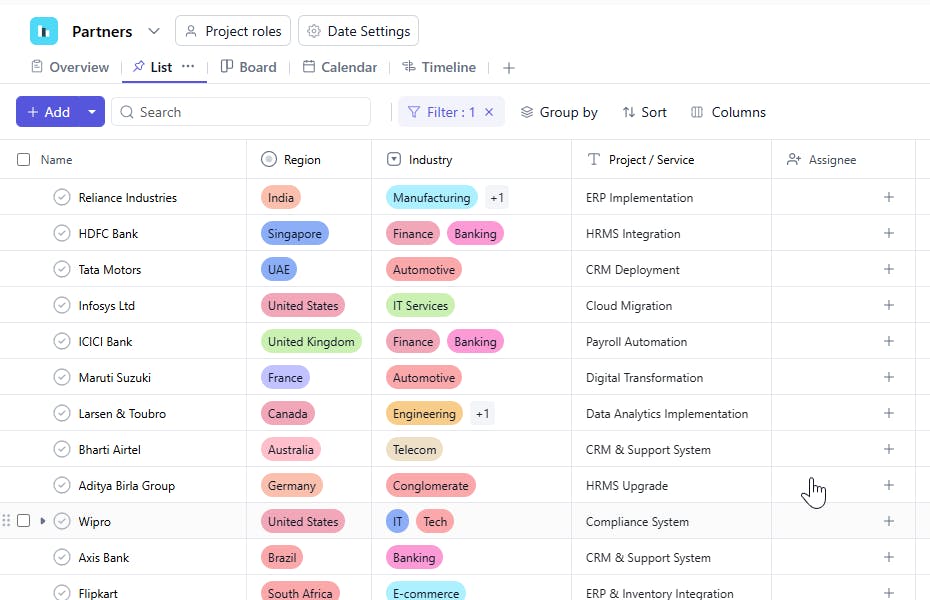
The Partners Template helps organizations maintain a clear and organized database of all active collaborations. It centralizes important information about each partner such as the services you work on together, industry focus, region, and partnership responsibilities. This makes it easier to manage ongoing relationships and identify growth opportunities.
Use TemplateCategories
What is a Partners Template?
A Partners Template is a structured system for tracking all current partners, vendors, collaborators, or strategic alliances your organization works with. Each task represents an active partnership entry and includes essential details like the type of service provided, the industry involved, and the region of operation.
By keeping everything in one place, teams can manage partner interactions smoothly, stay aligned on deliverables, and identify which partnerships are thriving or need attention.
Partners Template: Key Features
- Centralized Partner Management: Keep all details about each partner including industry, region, and services provided.
- Active Partnership Tracking: Monitor ongoing work, deliverables, timelines, and next steps.
- Regional Insights: Filter partners by Region to understand your current geographical footprint.
- Priority Tagging: Use Priority to highlight strategic or high-value partners requiring focused attention.
- Status Transparency: Track the state of each partnership using statuses like Active, On Hold, or Review Needed.
How to Use the Partners Template
- Create a Task for Each Partner: Add the Partner Name, Project/Service, and any additional partnership details.
- Specify Industry and Region: Note the Industry and Region relevant to the partnership.
- Track Timeline: Add Start Date and Due Date to manage commitments, renewals, or expected milestones.
- Set Priority Levels: Mark important partners with High, Medium, or Low priority.
- Update Status Regularly: Use Status to reflect progress such as Active, On Hold, or Needs Follow Up.
- Use as a Relationship Hub: Revisit the template to stay aligned, plan reviews, or identify expansion opportunities.
Custom Fields for Effective Tracking
The Partners Template includes the following custom fields:
- Partner Name – The organization or individual you are currently collaborating with.
- Project / Service – The work being done together (e.g., Software Implementation, Marketing Support, Consulting, Reseller Partnership).
- Industry – The sector the partner operates in (e.g., Technology, Retail, Healthcare, Finance).
- Region – The geographical location of the partner (e.g., India, North America, Europe).
- Status – Indicates the current partnership stage (e.g., Active, On Hold, Review Needed).


