
Templates
Sales and Marketing Plan
The Sales and Marketing Plan Template is your ultimate tool for organizing, planning, and tracking sales and marketing initiatives, ensuring alignment with business goals and efficient execution.
Use TemplateCategories
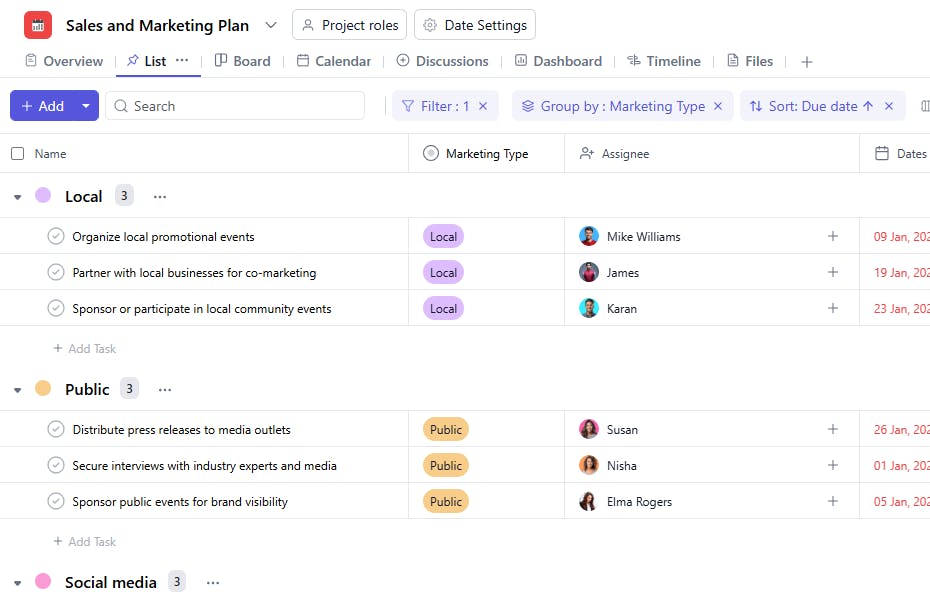
What is a Sales and Marketing Plan Template?
A Sales and Marketing Plan Template provides a structured framework to organize and manage tasks related to sales and marketing strategies. By tracking tasks, assigning responsibilities, and monitoring deadlines, this template ensures that your plans are executed efficiently and effectively.
Here’s a closer look at its key features:
Sales and Marketing Plan Template: Key Features
- Structured Planning: Break down your sales and marketing strategy into clear phases, from market research to campaign execution and performance analysis.
- Collaborative Workflow: With built-in communication tools, the template makes it easy for marketing and sales teams to share insights, feedback, and stay aligned on goals.
- Customizable to Your Business: Whether you’re launching a new product or working on a quarterly marketing campaign, the template can be adapted to fit your unique objectives.
How to Use the Sales and Marketing Plan Template?
Here’s a step-by-step guide to using SmartTask’s Sales and Marketing Plan Template:
- Create a New Project: Log into SmartTask, click "New Project," and select the Sales and Marketing Plan template.
- Define Your Goals: Customize the template by setting your business’s specific sales and marketing goals, such as increasing lead generation or improving brand awareness.
- Organize Strategy Phases: The template guides you through all key phases, including market research, campaign creation, and performance review.
- Collaborate with Your Team: Share updates, track progress, and discuss strategies with team members using SmartTask’s collaboration features.
- Track Performance: Use the final phase to assess campaign results, analyze ROI, and adjust strategies for future success.
Custom Fields for Enhanced Organization
SmartTask’s Sales and Marketing Plan Template includes several custom fields to manage your tasks effectively:
- Marketing Type: Advertising, Content Creation, Sales Outreach.
Additional Customization Options
Here are a few ways to further customize the Sales and Marketing Plan Template:
- Priority Levels: Add a field to categorize tasks as High, Medium, or Low priority.
- Budget Allocation: Include a field to track the budget for specific marketing initiatives.
- Progress Indicators: Add statuses such as Pending, In Progress, or Completed.
- KPIs and Metrics: Integrate fields to track performance metrics like leads generated or ROI.
- Visual Tools: Use Gantt charts or Kanban boards for better visualization of timelines and progress.


