
Templates
Social Media Analytics
The Social Media Analytics Template equips you with a structured and efficient approach to track performance, analyze data, and optimize social media strategies for better results.
Use TemplateCategories
What is a Social Media Analytics Template?
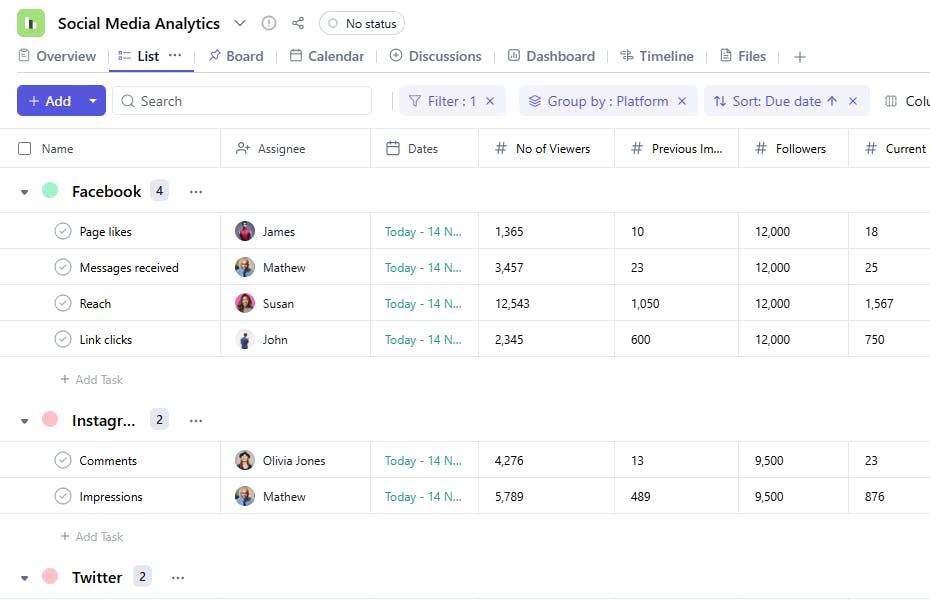
A Social Media Analytics Template helps you monitor the performance of your social media campaigns by tracking key metrics such as impressions, viewers, and followers. This ensures a clear understanding of your campaigns' success and areas for improvement.
Here’s a closer look at its key features:
Social Media Analytics Template: Key Features
- Comprehensive Metric Tracking: Track important social media metrics like engagement rate, reach, impressions, and click-through rate (CTR) across various platforms.
- Data-Driven Insights: Organize and visualize your data to make informed decisions about your social media strategy.
- Collaborative Analysis: Share findings, discuss trends, and adjust strategies in real time with team members.
- Customizable Reports: Generate and tailor reports to suit your specific business goals, whether it's for monthly reviews or campaign performance analysis.
How to Use the Social Media Analytics Template
Here’s a step-by-step guide to using SmartTask’s Social Media Analytics Template:
- Create a New Project: Log into SmartTask, click "New Project," and select the Social Media Analytics template.
- Tailor to Your Goals: Customize the template by setting your project’s specific objectives, such as increasing brand awareness or driving traffic to your website.
- Track Key Metrics: Add relevant social media metrics, such as engagement, follower growth, and post reach, and track them over time.
- Collaborate in Real-Time: Use collaboration tools to discuss trends, share insights, and update strategies with your team.
- Generate Reports: Once your data is collected, create detailed reports to assess performance and adjust your strategy accordingly.
Custom Fields for Enhanced Organization
SmartTask’s Social Media Analytics Template includes several custom fields to track and analyze social media performance effectively:
- Platform: Facebook, LinkedIn
- Current Impressions: The number of impressions during the current period.
- Previous Impressions: The number of impressions from the previous period for comparison.
- Target: The performance goal for the task.
- Number of Viewers: The total viewers for the content analyzed.
- Followers: The follower count on the platform during the analysis period.
- Performance: Excellent, Needs Improvement.
Additional Customization Options
Here are a few ways to further customize the Social Media Analytics Template:
- Engagement Metrics: Add fields for tracking likes, shares, and comments.
- Visual Dashboards: Generate visual dashboards to illustrate key metrics and trends.
- Automated Reports: Create automated reports to share insights with your team.
- KPI Integration: Integrate additional KPIs, such as click-through rates or conversion rates.
- Trend Analysis: Add fields to track trends in performance over time.


