
Templates
Solar Project
The Solar Project Template provides a comprehensive structure to plan, execute, and track all activities involved in solar power project implementation. It ensures smooth coordination between technical, procurement, and installation teams while maintaining a clear view of project progress across multiple stages. This template is ideal for renewable energy firms, contractors, and engineering teams managing residential, commercial, or industrial solar projects.
Use TemplateCategories

What is a Solar Project Template?
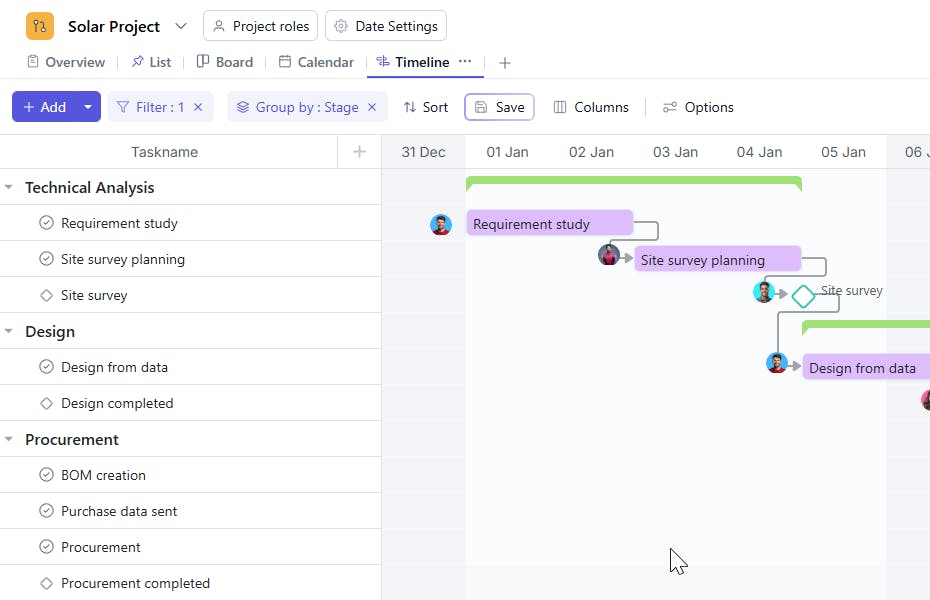
A Solar Project Template is a structured workflow tool that helps manage all aspects of solar project execution from initial technical analysis to final commissioning. It allows teams to track project progress, assign responsibilities, manage dependencies, and ensure timely delivery.
Each task is categorized under a specific Stage such as Technical Analysis, Design, Procurement, Installation, or Commissioning, ensuring every phase is executed systematically. This setup promotes accountability, reduces delays, and provides full visibility across all project components.
Here’s a closer look at its key features:
Solar Project Template: Key Features
- Stage-Wise Execution: Manage solar project activities through defined stages - Technical Analysis, Design, Procurement, Installation, and Commissioning.
- Cross-Team Coordination: Facilitate seamless collaboration between engineering, procurement, and installation teams.
- Dependency Management: Clearly define which tasks depend on previous ones to maintain workflow order.
- Progress and Priority Tracking: Use custom fields to set task priorities, monitor progress, and ensure critical activities are completed on time.
- End-to-End Visibility: Gain a clear overview of all stages, helping teams monitor timelines, responsibilities, and interlinked dependencies.
How to Use the Solar Project Template
- Define Project Stages: Start by setting up stages such as Technical Analysis, Design, Procurement, Installation, and Commissioning.
- Add Tasks Under Each Stage: Include detailed activities under each phase (e.g., site survey, equipment selection, installation, and testing).
- Assign Responsibilities: Allocate each task to the responsible engineer, technician, or department.
- Set Start and End Dates: Define timelines for each task to ensure all stages stay on track.
- Manage Dependencies: Use the Dependent On Tasks field to specify prerequisites before proceeding to the next task.
- Monitor and Update: Regularly review task progress and update stages as work transitions from one phase to another.
Custom Fields for Enhanced Organization
This Solar Project Template includes the following custom fields for detailed tracking and management:
- Stage: Indicates the phase of the solar project - Technical Analysis, Design, Procurement, Installation, or Commissioning.
Additional Customization Options
You can further enhance the Solar Project Template by adding:
- Equipment Type: To specify solar panels, inverters, or batteries used.
- Vendor Details: To record supplier information for procurement tracking.
- Inspection Status: To monitor site and component inspections.
- Warranty Period: To document equipment warranty timelines.
- Client Name: To associate the project with specific clients or sites.


