
Templates
Support Requests
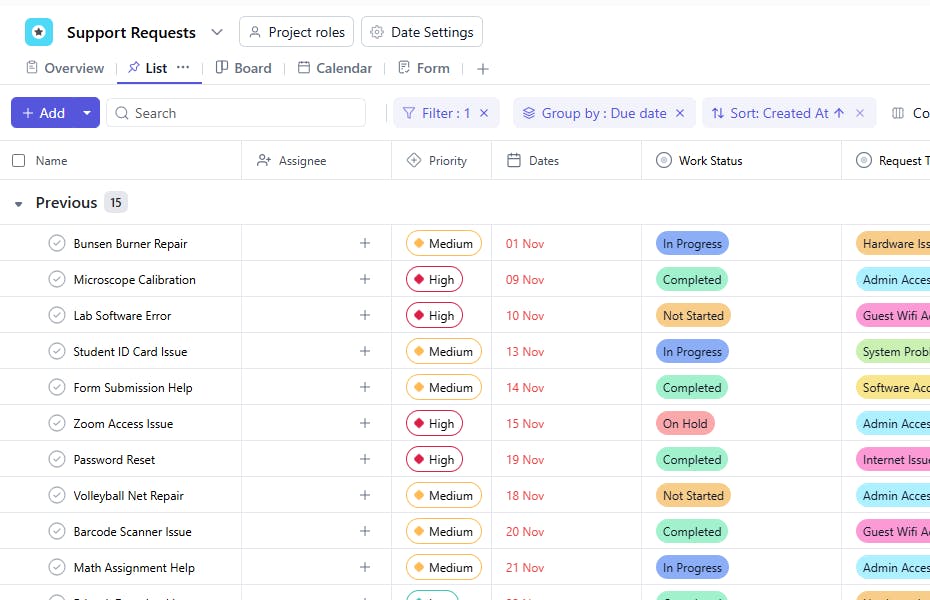
The Support Requests Template helps organizations, educational institutions, and service teams efficiently manage, track, and resolve support or service-related requests. It ensures that every request — whether technical, administrative, or departmental — is logged, prioritized, assigned, and completed in a timely and organized manner.
Use TemplateCategories
What is a Support Requests Template?
A Support Requests Template is a structured framework that centralizes all incoming support tickets or requests in one workspace. Each task represents a unique request and captures important details like request type, requester information, department, priority level, and completion status.
By using this template, teams can streamline communication, ensure accountability, and maintain transparency in request resolution processes — minimizing delays and improving overall response efficiency.
Support Requests Template: Key Features
- Centralized Request Tracking: Keep all departmental or organizational requests in one place for easy monitoring.
- Priority Management: Classify requests based on urgency to allocate resources effectively.
- Department-Wise Organization: Filter and sort requests by department or requester type for better management.
- Approval & Follow-Up System: Track approval statuses and set follow-up dates to ensure timely resolution.
- Complete Accountability: Assign each request to a responsible team member for clarity and progress tracking.
How to Use the Support Requests Template
- Create a Task for Each Request: Log every new request as a task and assign a Request ID for tracking.
- Add Request Details: Fill in fields like Requested By, Department/Class, and Request Type to categorize the request.
- Set Priority and Timeline: Use Priority, Request Date, and Required By to define the urgency and deadlines.
- Assign Responsibility: Allocate the request to the appropriate person or team under the Assigned To field.
- Track Progress and Approval: Update Status, Completion Date, and Approval Status as the request moves through different stages.
- Add Remarks and Follow-Up Dates: Use the Remarks section for notes or updates, and set a Follow-Up Date for ongoing monitoring.
Custom Fields for Support Requests
This Support Requests Template includes the following fields for organized and detailed tracking:
- Request ID – Unique identifier assigned to each request for tracking purposes.
- Requested By – Name of the person or department raising the request.
- Department/Class – Department or class to which the requester belongs.
- Request Type – Category of the request (e.g., IT, Facility, HR, Academic).
- Description – Detailed information about the request or issue.
- Priority – Urgency level (High, Medium, Low).
- Request Date – The date the request was submitted.
- Required By – The target date by which the requester expects resolution.
- Status – Current progress stage (Open, In Progress, Completed, Closed).
- Assigned To – Team member or department responsible for handling the request.
- Completion Date – Date the request was resolved or closed.
- Approval Status – Indicates whether the request has been Approved, Pending, or Rejected.
- Remarks – Additional comments, notes, or update history.
- Follow-Up Date – Scheduled date to review the request’s progress or ensure satisfaction.


