
Templates
Web Page Production
The Web Page Production Template streamlines how teams plan, build, review, and publish pages keeping owners, writers, designers, and developers perfectly in sync from brief to “Live.”
Use TemplateCategories
Slide 1 of 2 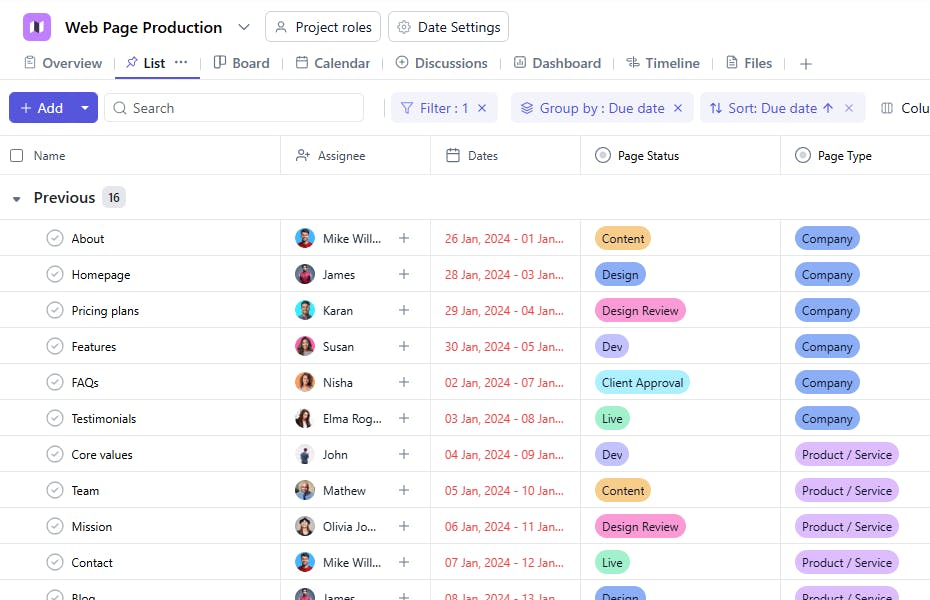
Slide 2 of 2 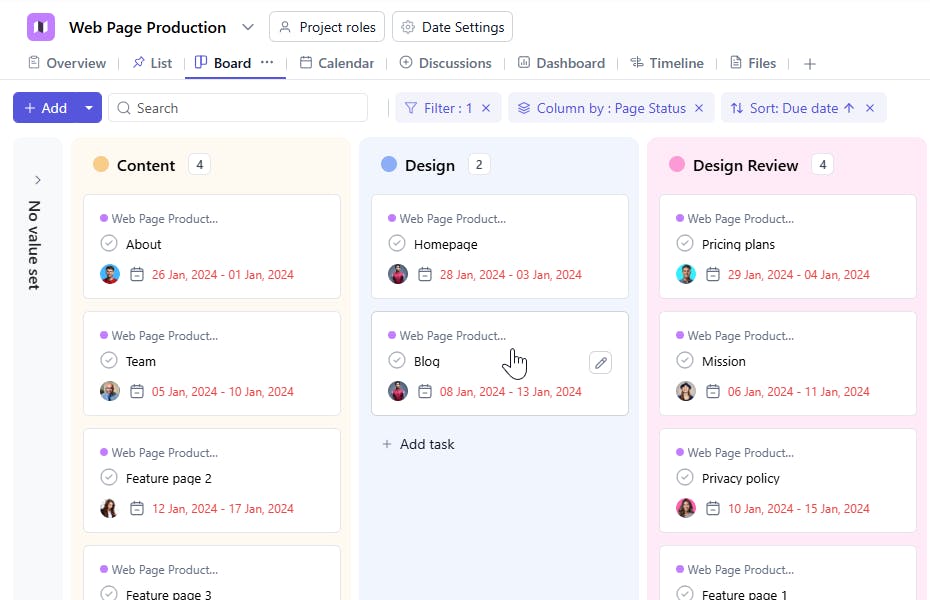
What is a Web Page Production Template?
A Web Page Production Template is a structured workflow for producing website pages end-to-end. It centralizes page briefs, ownership, deadlines, assets, and approvals so every page moves smoothly through Content → Design → Dev → Client Approval → Live.
Web Page Production: Key Features
- Structured Pipeline: Standardized stages ensure nothing slips between content, design, build, QA, and approval.
- Cross-functional Collaboration: Comments, file attachments, and @mentions keep writers, designers, and developers aligned.
- Reusable for Any Page Type: Use the same template for product/service pages, supporting pages, company pages, or template library items.
- Clear Accountability & SLAs: Assignees, due dates, and dependencies keep delivery predictable.
How to Use the Web Page Production Template
- Create a Project: In SmartTask, click New Project → select Web Page Production from template library.
- Add Pages: Create one task per page (e.g., “Pricing,” “Features → Automations,” “About,” “Blog Post Template”).
- Set Custom Fields (see below): choose Page Type and Page Status for each page.
- Define the Brief: In the task description, add goals (SEO/Conversion), target audience, required sections, and references.
- Assign & Schedule: Add owners for content, design, and dev; set due dates and dependencies (Design after Content, Dev after Design, etc.).
- Collaborate & Attach: Drop wireframes, copy docs, assets, and links; capture feedback in comments.
- QA & Approvals: Run checks (copy accuracy, design fidelity, responsiveness, performance, SEO) → move to Client Approval → then Live.
- Publish & Log: On go-live, update changelog/notes, add URLs, and mark success metrics to review later.
Custom Fields
- Page Status (single-select)
- Values: Content, Design, Dev, Client Approval, Live
- Page Type (single-select)
- Values: Product / Service, Supporting, Company, Templates
More Customization Options
- Brief & Success Metric (goal, KPIs, primary CTA)
- SEO (focus keyword, title tag, meta description, H1, internal links)
- Content Checklist (hero, features/benefits, proof, FAQs)
- Design Notes (layout, components, brand constraints)
- Dev Notes (CMS route, schema, components, tracking)
- QA Checklist (copy, links, forms, responsiveness, performance, accessibility)


