
Templates
Workshop Calendar
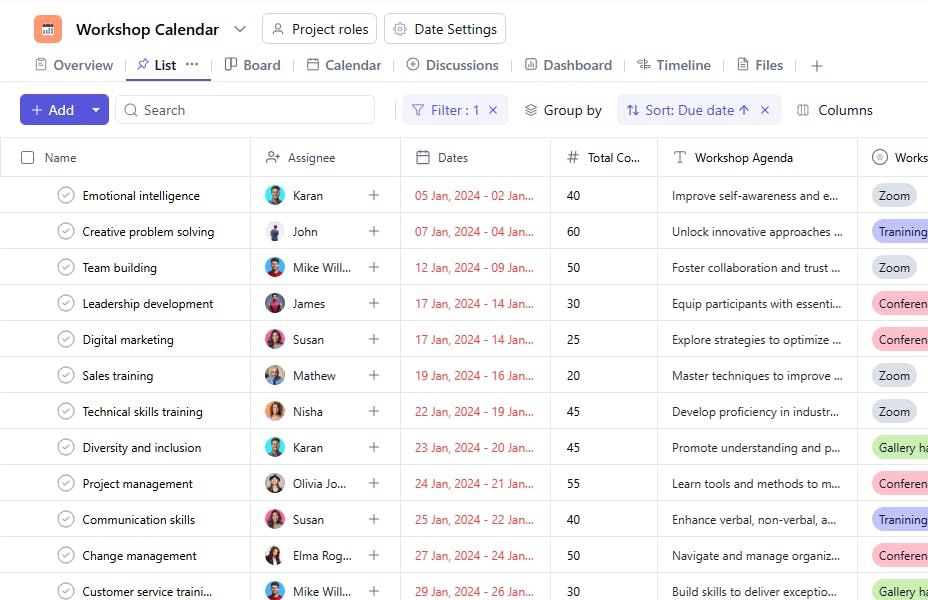
The Workshop Calendar Template ensures effective planning, organization, and execution of workshops, enhancing coordination and achieving desired outcomes. It provides a centralized framework to schedule, manage, and track workshops seamlessly.
Use TemplateCategories
What is a Workshop Calendar Template?
A Workshop Calendar Template provides a structured framework to plan and manage workshops. It helps track critical details such as purpose, venue, agenda, and supporting materials, ensuring smooth operations and clarity across all involved stakeholders.
Here’s a closer look at its key features:
Workshop Calendar Template: Key Features
- Organized Scheduling: Plan workshops by setting dates, times, and locations. Ensure every session is accounted for and no overlaps occur.
- Seamless Coordination: The template helps you manage facilitators, guest speakers, and other stakeholders, ensuring everyone is on the same page.
- Customizable to Your Needs: Whether it’s a corporate training session or a creative workshop, the template can be adjusted to fit different formats, goals, and audiences.
How to Use the Workshop Calendar Template?
Here’s a simple guide to using SmartTask’s Workshop Calendar Template:
- Create a New Project: Log into SmartTask, click "New Project," and select the Workshop Calendar template.
- Customize the Calendar: Add specific workshop details like topics, facilitators, dates, and times.
- Organize Sessions: Break down the calendar into different stages: pre-workshop preparation, event day activities, and post-event follow-up.
- Collaborate in Real-Time: Share updates, tasks, and notes with your team through SmartTask’s communication tools.
- Track & Adjust: Track registration, attendance, and feedback in real time to improve future workshops.
Custom Fields for Enhanced Organization
This Workshop Calendar Template includes the following fields for better tracking and management:
- Venue: The location where the workshop will take place.
- Workshop Purpose: Why this workshop has been conducted (Eg, Innovation, Collaboration, Engagement)
- Time: The specific time the workshop starts.
- Supporting Materials: handouts, presentations
- Total Count: The number of participants attending the workshop.
- Agenda: A detailed outline of the topics or activities planned for the workshop.
Additional Customization Options
Here are a few ways to further customize the Workshop Calendar Template:
- Workshop Type: Add a field to classify workshops by type (e.g., Training, Brainstorming).
- Budget Tracking: Include a section to track the budget allocated and expenses incurred.
- Feedback Collection: Add a section for collecting participant feedback post-workshop.
- Priority Level: Mark workshops as high, medium, or low priority.
- Follow-Up Actions: Include a section to list follow-up tasks after the workshop.


